
👋 Welcome back to AI for SME Success, your weekly dose of quick, practical AI insights for small businesses.
Here’s what we’re covering today:
- 🏷️ How to Keep Your AI Visuals On-Brand
- 🛠️ 2025 Surge of Specialized AI Tools
- 🗑️ 2025 Word That Defines AI Use
- ✨ 2025 ChatGPT & Gemini SME Resources
🏷️ How to Keep Your AI Visuals On-Brand
When you use AI for your business, one of the most important goals is preserving your brand voice, look, and consistency.
AI can speed things up, but without proper guardrails, it can also dilute your brand.
Here are three tips to help you keep your visuals on brand when working with AI.
Let’s dive in 👇
1️⃣ Add Your Brand Colors
If you don’t know your brand hex codes (short for hexadecimal color codes), you can:
- Upload a visual sample of your brand to an AI chatbot, or
- Manually extract colors using tools like Canva’s color picker
As shown in the illustration below, AI does not recognize brand colors perfectly.
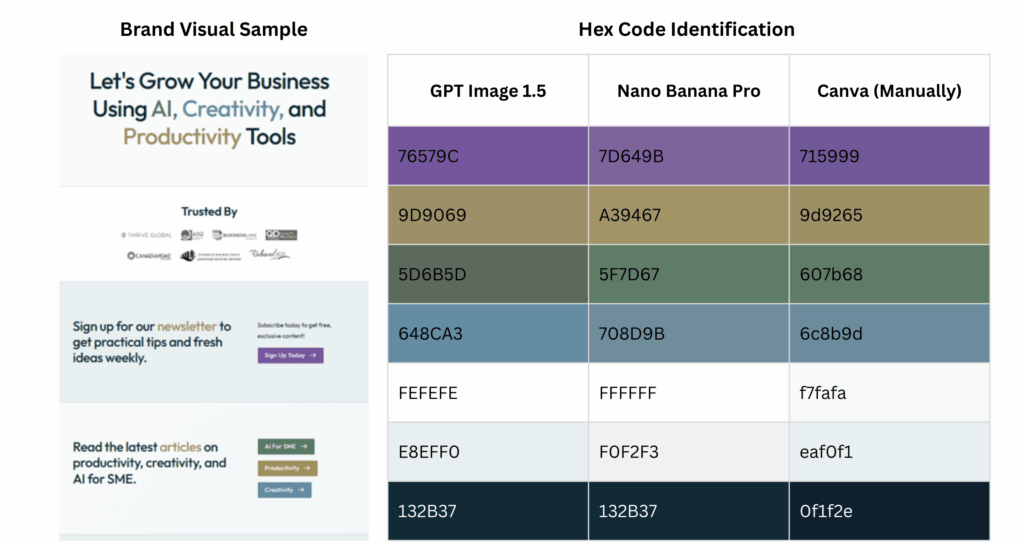
Illustration: Accuracy of AI Tools in Identifying Color HEX Codes
👉 My recommendation: Always identify your hex codes manually, then feed those values into your tools.
Once you have your hex codes, store them directly in the tools you use most.
When prompting:
- Name your colors explicitly (e.g., “Use #6C8B9D for primary accents”), or
- Ask AI to “use my brand colors from the Brand Kit / Custom Instructions”
As shown below, AI tools usually stay close enough to your palette.
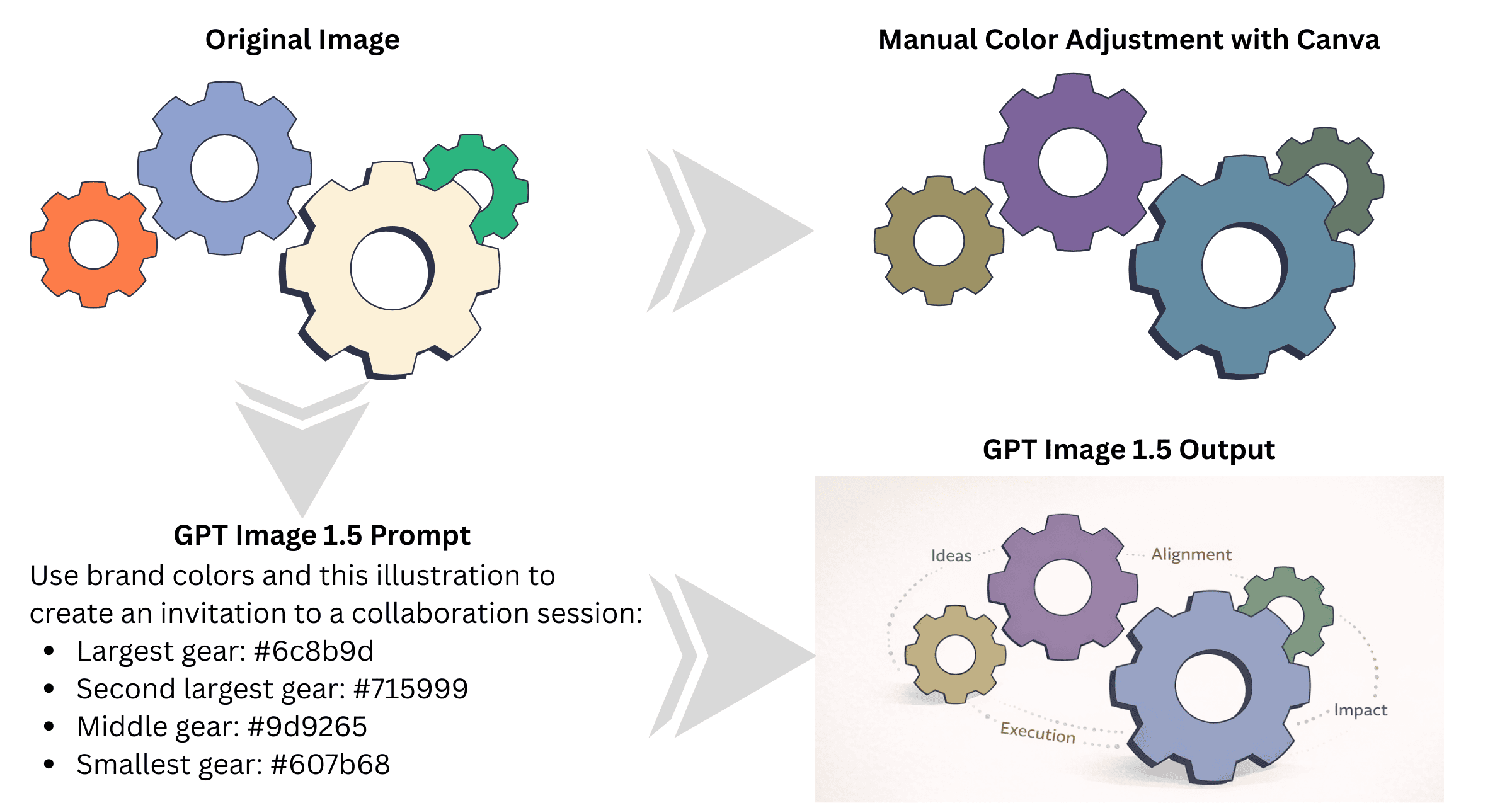
Illustration: Accuracy of AI Tools in Identifying Color HEX Codes
2️⃣ Keep It Simple
When you ask AI to create a complex, multi-element visual where precise positioning, sizing, colors, and relationships between elements matter, you will likely run into a chain of errors. Fixing one issue often causes another one to appear.
👉 My recommendation: Use a combination of AI tools alongside traditional editing tools. Understand the limits of AI tools and keep your tasks within those limits.
For example, when I tried to create a wheel with a scale inside each segment, and custom icons and text placed outside the segments, it was too much for a generic AI chatbot to handle. Fixing one error led to another one.
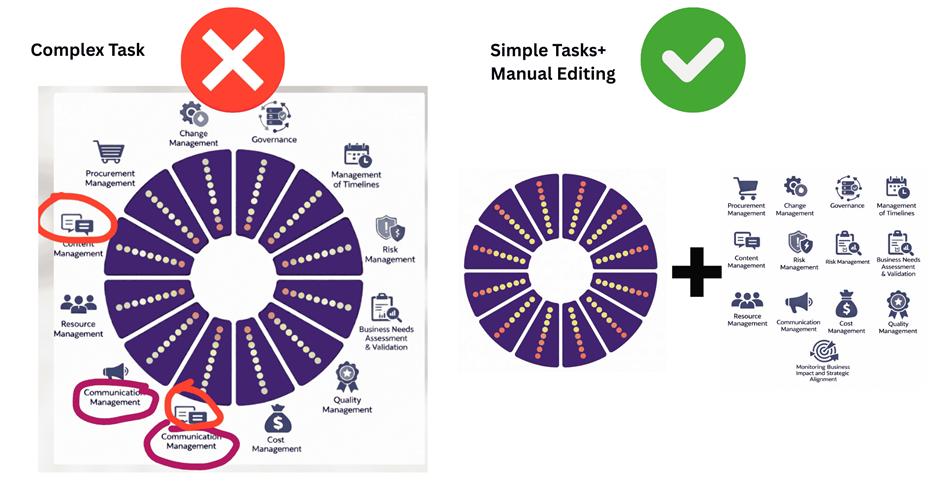
Illustration: Manual vs. AI-Driven Color Selection
The solution to this problem is splitting the task into two parts. First is generating the wheel. The second is creating a table with wording and custom icons. These new images should be assembled manually using image editing tools.
3️⃣ Add Text Inside Images Manually
AI image models consistently fail to generate accurate text inside images.
The core issue is that most models treat text within videos and images as a visual pattern, not as language with meaning, spelling, or structure. As a result, letters blur, words distort, spacing breaks, and edits become unpredictable, especially when text size, alignment, or updates matter.
👉 My recommendation: Never rely on AI to generate final, business-ready text inside visuals. Use AI to create the visual layout or background, then add all text manually in design tools where typography, spacing, and brand consistency can be controlled.
In the illustration below, you can see the difference between AI-generated video text and AI-generated video with text added through manual editing.
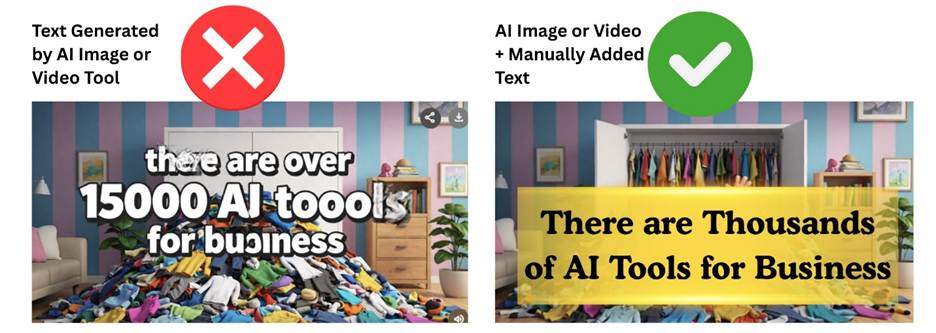
Illustration: One Complex AI Task vs. Several Simple Ones
🛠️ 2025 Surge of Specialized AI Tools
In 2025, the AI landscape continued to shift toward specialized platforms.
A recent article, “AI Billionaire Boom,” published on December 25, 2025, by CEOWORLD Magazine, describes the emergence of a new generation of AI billionaires.
Here is a list of companies founded by newly minted AI billionaires which deliver enterprise-grade capabilities for SMEs:
- Mercor. Automates hiring and vetting, helping businesses find top remote talent without the cost of traditional recruiters.
- Cursor. An AI-powered code editor that enables small teams to build professional-grade software using natural-language prompts.
- Lovable. Natural-language app creation that allows non-technical founders to launch full-stack applications quickly.
- ElevenLabs. Advanced AI audio tools to clean recordings, create sound effects, and design or clone custom voices.
- Sierra. Conversational AI agents that handle 24/7 customer service and AI agents.
🗑️ 2025 Word That Defines AI Use
“Slop,” referring to low-quality digital content, earned the title of Word of the Year from Merriam-Webster. The term captures the surge of distorted ads, fake news, junky AI-written books, low quality video content, and viral nonsense flooding our screens.
In fact, a recent study AI Slop Report released by online video editor Kapwing analyzed thousands of new YouTube feeds and found that 21–33% of videos consist of low-effort, mass-produced AI slop, optimized for clicks rather than real value.
✨ 2025 ChatGPT & Gemini SME Resources
In 2025, ChatGPT developed a library of use cases, workflows, and 101 and 102 courses for small business. The workflows include seasonal planning, customer response, service updates, and client communications.
In 2025, Google Gemini introduced new SME resources, including the AI for Small Business hub with use cases, workflows, and prompts, and AI training and tools for small businesses offering free training, workshops, coaching support, and FAQs.
💬 I’d love to hear from you!
I’d love to hear from you. What’s working, or not working, when you use AI in your business?
Reach me at natalia@nataliabrattan.com.
Your questions and feedback help shape future issues of AI for SME Success.
Till next week,
Natalia