
👋 Welcome back to AI for SME Success, your weekly dose of practical AI insights and updates that matter to small businesses.
Here’s what we’re covering this week:
- 2 Use Cases Where AI Wins, Per Goldman
- Common Mistakes in Using AI, According to Anthropic
- My New CanadianSME Article on AI Hallucinations
- Why and How to Connect AI to Your Apps
- New Nano Banana Prompting Guide
🏆 2 Use Cases Where AI Wins, Per Goldman
Last year, MIT’s State of AI in Business 2025 found that only 5% of enterprises yielded measurable returns on AI investment.
This year’s Goldman Sachs data, cited in Fortune’s recent article “Goldman Finds ‘No Meaningful Relationship Between AI and Productivity at the Economy-Wide Level,” is even more sobering.
Among S&P 500 management teams, a half of all companies discussed AI, but fewer than 20% use it for any business functions. Only 10% of S&P 500 leaders quantified AI’s impact on specific use cases, while just 1% quantified its impact on earnings.
However, the data reveals that reported productivity gains of around 30% are concentrated in two specific use cases:
- Customer support
- Software development tasks
Takeaway:
If you haven’t decided which process to automate with AI first, consider customer support and software development.
🎯 Common Mistakes in Using AI, Per Anthropic
Using AI has long turned from an art into a concrete science. Anthropic created an AI Fluency Framework with four core competencies: Delegation (choosing what to hand off to AI), Description (effective communication with AI), Discernment (evaluation of AI output), and Diligence (responsible collaboration with AI).
These four core competencies break down further into 24 AI user behaviors required for profitable and safe use of AI. 13 of these behaviors are hard to observe directly. Examples are disclosure of AI-generated work or identification of what tasks should be delegated to AI.
11 behaviors, which can be observed, were were statistically analyzed by Anthropic using a sample of 10,000 real conversations.
The chart describes the results of the study and illustrates where users excel and miss the mark.
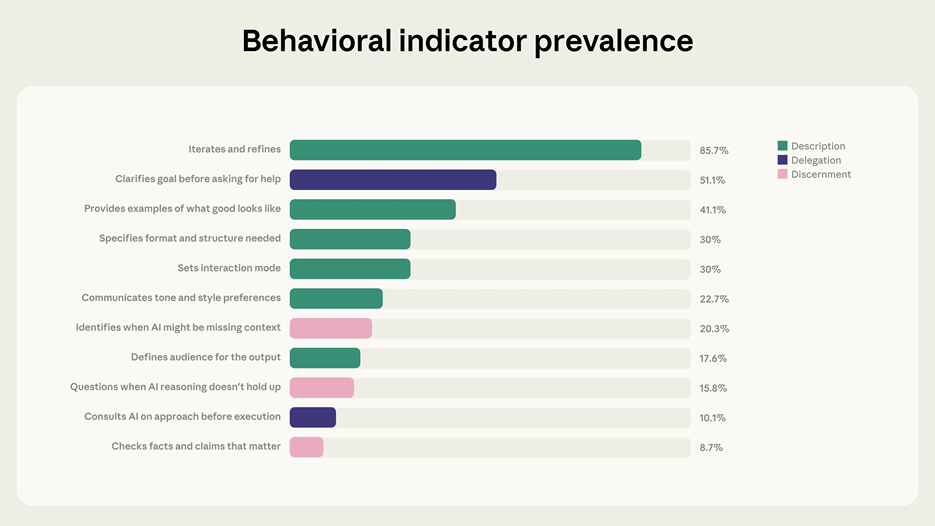
Source: Anthropic, AI Fluency Index
Not surprisingly, most users (85.7%) iterate and refine.
Only 20% to 50% of users apply such good practices as goal clarification, providing examples, specifying output format, communicating tone, and defining audience for output.
Less than 16% of users check facts, question when AI reasoning seems to fail, and consult AI on approaches.
Key Takeaways:
1️⃣ Start every AI prompt with a clear brief. Before asking AI for anything, define: goal, audience, tone, and output format. Example: “Summarise this grant description for a retail business owner with no tech background. Tone: simple and encouraging. Format: 3-sentence summary plus a yes/no eligibility checklist.”
2️⃣ Use AI as a collaborator. Work with AI to plan your approach to working with AI. Example: “What is missing from this prompt to get the best outcome?”
3️⃣ Build verification steps into your AI workflow. Always ask: “What sources support this?”, and fact-check manually. When in doubt, ask AI to explain its reasoning to verify accuracy step-by-step.
🌀 My CanadianSME Article on AI Hallucinations
My latest article in Canadian SME Business Magazine, “AI Hallucinations Are Turning SME Efficiency into Liability. Here is How to Reduce the Risk,” explores five practical strategies which can significantly reduce the risk:
- Develop an AI Policy. Document which tools are permitted, who can use them, acceptable use cases, and when human review is required.
- Define Vendor AI Use. Include contractual clauses specifying how vendors may use AI, ensuring their practices align with your own standards.
- Choose RAG Tools. For accuracy-critical work, Retrieval-Augmented Generation (RAG) tools that cite only sources you provide can cut hallucinations by 70–80%.
- Use Grounding Prompts. Break requests into smaller tasks, require source citations, and use chain-of-thought prompting to improve output reliability.
- Match Tasks to Error Tolerance. Limit use of AI to validated, low-risk workflows with documented prompts and regular audits.
🔗Why and How to Connect AI to Your Apps
Tools like Google Gemini, ChatGPT, or Claude become much more useful when they can act on your data. You can connect your AI chatbot to many different tools, including Notion, Obsidian, Canva, Monday, Jira, or Excel.
Let’s walk through what this looks like in practice, using the integration between Canva and Claude as an example.
When Claude is connected to Canva, it can “see” your existing templates, font choices, and layout constraints. That means it writes headlines that fit your character limits and match your tone. Tell Claude “Rewrite slide number 4 to be punchier” and it updates in place. You can also batch multiple illustrations and push structured copy into Canva templates in a single step.
Here are two good resources showing examples of the productivity gains from integrating AI with apps. Both include practical examples and have strikingly similar titles:
- “I Connected Claude with These 5 Apps, and It’s Productivity on Steroids,” published by XDA Developers on February 28
- “I Connected Gemini with These 4 Apps, and It’s Productivity on Steroids,” published by Android Police on March 9
There are three main approaches to connect AI chatbots to applications: native integrations built directly into the app, automation platforms like Zapier or Make, or custom-built solutions using the AI provider’s developer API.
🖌️New Nano Banana Prompting Guide
On March 5 Google published The Ultimate Nano Banana Prompting Guide. The guide focuses on moving beyond simple keywords to adopt a “Creative Director” mindset, providing a structured five-part framework: Subject, Composition, Action, Location, and Style.
Key highlights include advanced techniques for studio-quality control, such as specifying lighting setups, lens types, and cinematic color grading.
It also details the model’s new typographic capabilities, allowing users to render precise, multi-language text using quotes and specific font descriptions.
Additionally, the guide explores multimodal editing, where users can modify images via “semantic masking” (inpainting) or by uploading reference images for style transfers.
Thank you for reading today’s edition!
If this issue was valuable, pass it along to a fellow business owner.
Also, I’d love to hear your feedback, questions, or topic suggestions at natalia@nataliabrattan.com.
See you next week,
Natalia