👋 Welcome back to AI for SME Success, your weekly dose of quick, actionable AI insights for small businesses.
Here’s what we’re covering today:
🧑🎨 How to Prompt with Visuals
📊 NEW: NotebookLM Summary Tables
🚨 How to Check if Your AI Chats Were Sold
🎁 Let’s Shape 2026 Together!
🖼️ How to Prompt with Visuals
Did you know that using images as prompts is one of the most effective ways to get great results? Whether you are generating marketing content or reviewing physical inventory, your AI tools can now “see” as well as they “read.”
In this week’s newsletter, we explore five practical ways to use visuals to drive better business outcomes.
Let’s dive in!
1️⃣Counting Objects
AI chatbots can identify and count objects within an image. This helps estimate many things including event attendance, product stock on a shelf, or materials on a job site.
Accuracy typically ranges between 70% and 98%.
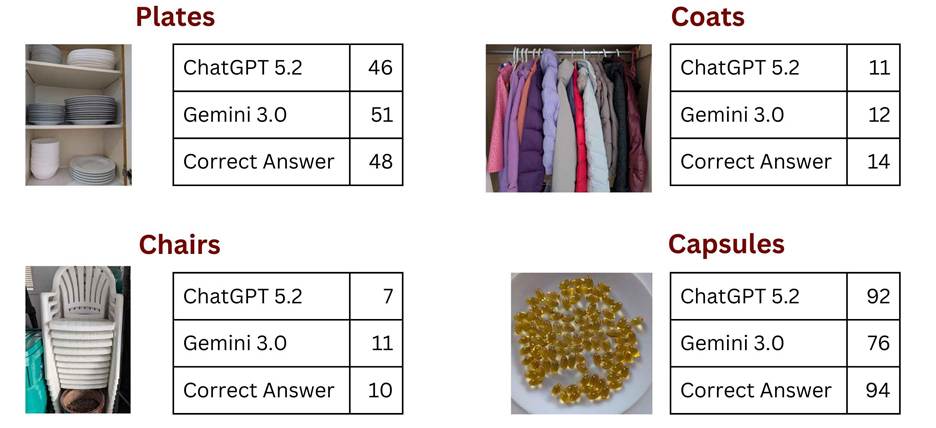
Object Counting with ChatGPT 5.2 and Gemini 3.0
2️⃣ Prompting by Drawing
If you would like to add a new object to your visual, draw it in your desired location with your desired shape and dimensions, rather than describing it in writing.
This feature is ideal for use cases where size and location matter, such as optimizing floor plans and room layouts for event planning or landscaping.
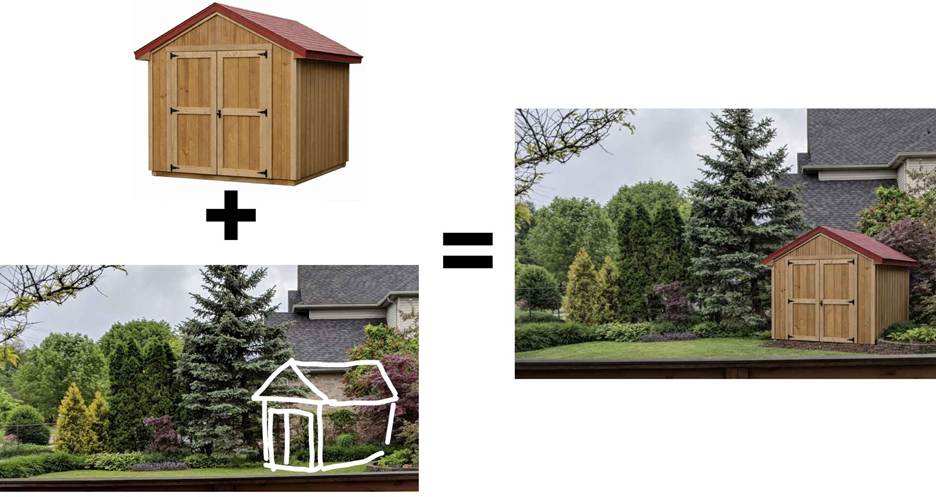
New Visual Created with GPT Image 1.5
3️⃣Digitizing Handwriting
Any handwritten artifacts can be easily digitized by AI using a simple prompt: “digitize this.” You can use this feature for handwritten customer surveys, intake and registration forms, whiteboarding sessions, sticky notes, and receipts to automate expense reporting.
Be extremely cautious when uploading documents containing Personal Identifiable Information (PII). Ensure your AI environment is secure and compliant with your data privacy policies.
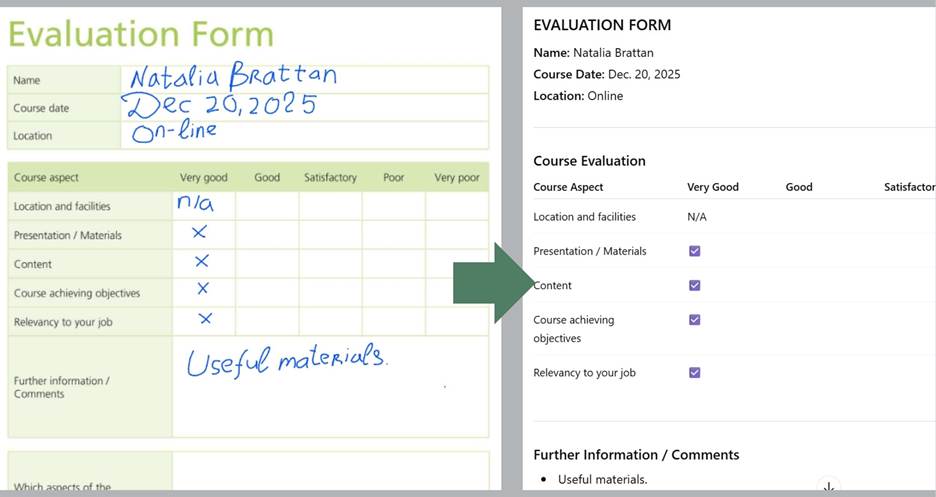
Evaluation Form Digitized with Gemini 3.0
4️⃣Creating Image Descriptions
AI can create text to describe illustrations in various forms, including product descriptions, social media posts, executive summaries, and listings.
It helps when you include examples of the deliverables you want to create.
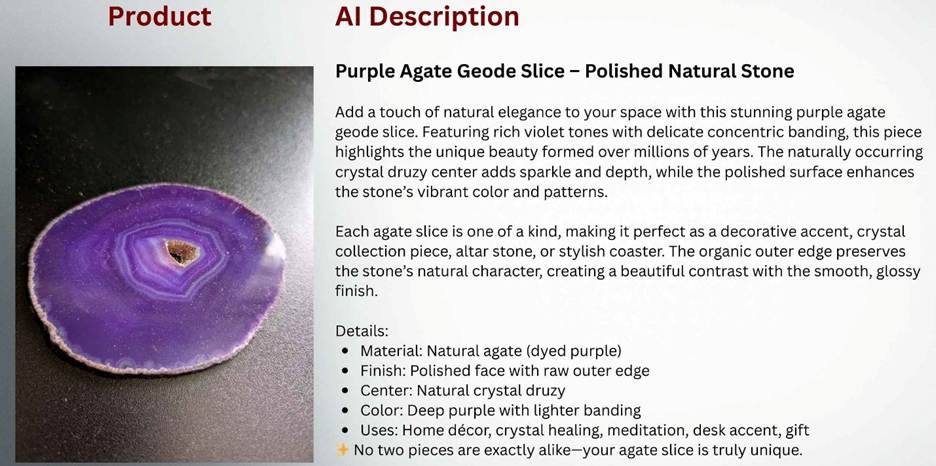
Product Description Created by ChatGPT 5.2
5️⃣Drawing Inspiration from Others
You can upload illustrations from industry leaders and competitor screenshots, then ask AI to either analyze their key value propositions or use their ideas for your design.
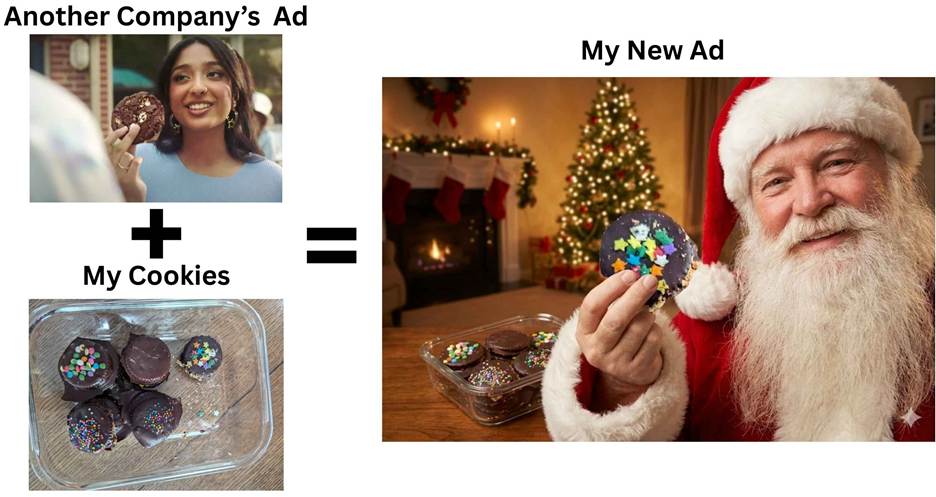
New Visual Created with Google Nano Banana
📊 Want Hallucination-Free Summary Tables? Try This New Feature in NotebookLM.
Google NotebookLM was recently upgraded with a Data Tables feature that allows you to merge documents without the typical limitations found in general AI like Gemini or ChatGPT. Here is why it is a game-changer for structured data:
- Strictly Your Data: Unlike general LLMs that may blend training data with your files, NotebookLM builds tables exclusively from your uploaded sources. This “grounded” approach significantly reduces the risk of hallucinations.
- Larger Scale: NotebookLM identifies connections across dozens of documents simultaneously. You can compare 20+ documents side-by-side in one table, a task where standard chat interfaces often hit context limits or lose track of details.
- Auditable Accuracy: Every data point in the table is hyperlinked. Clicking a cell takes you to the source document, making human oversight easier.
- Easier Editing: Unlike a chatbot response, Data Tables reside in “Studio” workspace, allowing you to refine and update them as your project evolves.
Use Case: Resume Screening
A hiring manager screens resumes against a job description. By uploading the requirements and candidate files into NotebookLM, they can generate a Decision Matrix. The tool instantly flags salary mismatches, visa requirements, and experience gaps in a single, auditable view, saving hours of manual cross-referencing.
🚨 How to Check if Your AI Chats Were Sold
In our last newsletter, we discussed the security risks of AI browsers. Today, we’re focusing on the dangers lurking in browser extensions.
“An AI assistant is not your friend, not your financial adviser, not your doctor, or your therapist. It’s someone else’s computer,” noted a Forbes article published on December 15, 2025, titled “How Your Private ChatGPT and Gemini Chats Are Sold for Profit.”
The article revealed that AI conversations from over 8 million users were sold for profit by browser extensions. The affected extensions, all from the same publisher, include:
- Urban VPN Proxy (Chrome & Edge)
- 1ClickVPN Proxy
- Urban Browser Guard
- Urban Ad Blocker
The investigation found that these extensions harvested chat logs from platforms such as ChatGPT, Claude, Gemini, Microsoft Copilot, Perplexity, DeepSeek, Grok (xAI), and Meta AI.
How to Check if You’re Affected
Navigate to edge://extensions or chrome://extensions. If any of the extensions listed above are installed, your private AI conversations were likely collected and sold.
If you use AI in your browser, remove them immediately.
🎁 Let’s Shape 2026 Together!
As we wrap up the year, I want to say thank you for being part of this community. I’m planning my 2026 content and I want it to be all about your success.
Email me at natalia@nataliabrattan.com with your feedback and win a 20-minute on-line consultation with me.
Please tell me: What should I double down on? More security deep-dives, hands-on use cases, or the latest tool updates? Which specific business process do you want to automate next?
Talk next week,
Natalia