
👋 Welcome back to AI for SME Success, your weekly dose of practical AI insights for small businesses.
Today we cover:
- Three ways to improve AI writing
- Another Big Four report packed with AI hallucinations
- Four guides on using AI loops in your business
- This week in AI: five new upgrades for SMEs
Let’s dive in! 👇
✍️ Three Ways to Improve AI Writing
Writing Dominates AI Use
Writing is how people use AI most, according to three recent reports. OpenAI’s Q1 2026 Signals update ranks editing written materials as the top use. Anthropic’s June Economic Index leads with documents, reports, and emails. Google’s ATLAS report puts drafting and refining text among its main workplace uses.
AI Writing Often Falls Flat
Unfortunately, AI writing is generic, repetitive, and hollow. It is also spreading fast across the internet. A new Pangram analysis of long-form posts found the highest concentration of AI-generated content on LinkedIn, followed by Medium and X/Twitter. On LinkedIn, roughly 40% of long-form posts were fully AI-generated.
LinkedIn is fighting back. On July 30, LinkedIn added a “Seems like AI slop” button. It appears in the three-dot menu on any post. Flags help train LinkedIn’s classifiers, limit how far a post travels beyond the author’s network, and trigger a private notice to the author in their analytics dashboard. LinkedIn also removed its “enhance your post” AI tool.
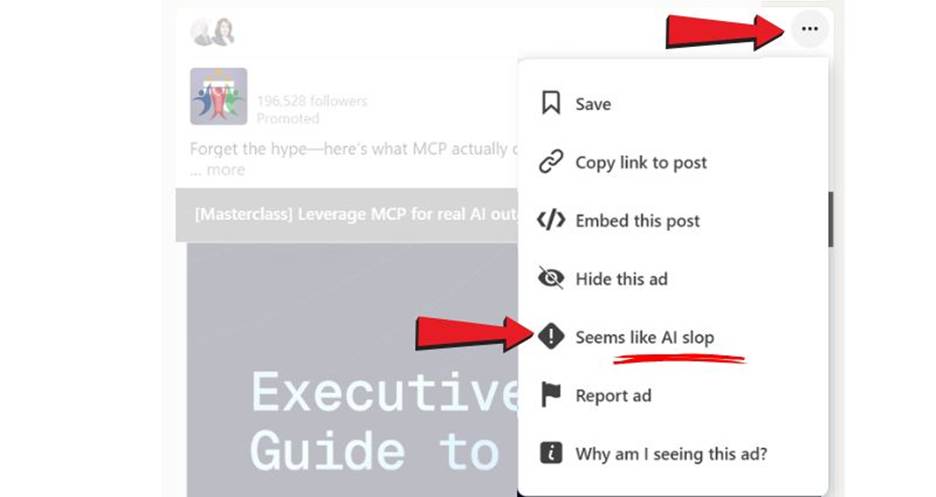
New LinkedIn “Seems like AI slop“ button
How to Upgrade AI Writing
Here are three things you can do to improve AI writing.
First, upload examples of your best writing. Second, create a style library. Third, upload system instructions that prevent a flood of dashes, filler words, and buzzwords.
Here is a system prompt created by James Newburrie:
“No antithesis. No corrective negation. No paragraph pinning. No parataxis. No summary beats. No rhetorical crutches. No negative parallelisms. No negative anaphoras. No contrasting pairs. No rule of three. No em dashes. No throat-clearing openers. No landing sentences. No setup/payoff constructions. No parallel sentence structures within a paragraph. Vary sentence length unpredictably. No stacked noun phrases. No filler intensifiers (genuinely, really, truly, actually). No corporate-register verbs (leverage, underscore, reflect). No nominalization. No hedging qualifiers. Write for the spoken voice. No performed enthusiasm.”
🔍 Another Big Four Report Packed with AI Hallucinations
Its not only how AI writes, but what it writes.
A GPTZero investigation found PwC published four Middle East reports containing AI hallucinations. One footnote even linked to a URL ending in “chatgpt.com.” PwC is now the fourth Big Four firm to face this issue, following Deloitte, EY, and KPMG.
This landed the same week PwC’s US chief warned companies against misusing AI.
One of the best ways to check whether a document you received is AI-generated is run it through a detector like GPTZero.
🔁 Four Guides on Using AI Loops in Your Business
The last few months in AI were all about loops.
Loops are the last stage in a progression from prompt (one instruction), to workflow (a set of instructions), to agent (instructions with a goal), to loop (a self-running cycle of improvements that repeats until success criteria are met).
All four major AI companies issued guides on looping:
- OpenAI’s agent improvement loop (May 12) shows how traces and human or model feedback can become evaluations that drive improvements to an agent.
- Google Cloud’s agent design pattern guide (May 28) treats the loop as one pattern among many and flags the main risk: with no clear termination condition, a loop can run forever and run up costs.
- Anthropic’s getting started with loops (June 30) names four types: turn-based, goal-based, time-based, and proactive, ordered by how much you hand off.
- Microsoft’s agent looping doc (updated August 10) says to always bound a loop, use a completion condition (a done marker, a checklist, or an AI judge), and cap iterations.
The simplest way to add a loop to a workflow or agent is to give the AI a way to check its own work, define what “done” looks like, and tell it to revise the output when it fails the check. For example, if you draft weekly customer refund replies, let the agent write each one, check it against your refund policy, and revise until it passes before handing it back to you.
📡 This Week In AI: Five New Upgrades for SMEs
New Wix, Google, Adobe, Anthropic, and Coinbase all shipped upgrades for small business.
- Wix. Wix launched Symphony, a standalone multi-agent platform for small businesses. A central agent called Maestro learns your business and coordinates specialist agents for outreach, marketing, scheduling, research, finance, and design. It works with any business, whether or not you already use Wix.
- Google. Google added AI and agentic experiences across Google Ads and Google Analytics to easier spot opportunities, transform data into visualizations with text prompts, and identify rooms to grow.
- Adobe. Adobe launched Adobe for ChatGPT, bringing 70-plus tools from Photoshop, Firefly, Acrobat, and Express into ChatGPT. Type @Adobe, describe what you want, and it routes the task to the right app automatically. Basic tools are free. Deeper features need a Creative Cloud plan.
- Anthropic. Anthropic turned the Claude in Chrome side panel into a full Cowork session. Skills, connectors, and history now carry across the browser, desktop, web, and mobile. It is live on Max and Team, reaching Pro soon.
- Coinbase. Coinbase for Agents now connects AI agents to Coinbase accounts, allowing them to trade, make payments, and run workflows within user-set limits.
Thank you for reading today’s edition.
If this issue was valuable, pass it along to a fellow business owner. I’d love to hear your feedback at natalia@nataliabrattan.com.
See you next week!