
👋 Welcome back to AI for SME Success, your weekly dose of practical AI insights for small businesses.
Today we cover:
- AI exposed a bank’s security gaps. What can it find in yours?
- Vibe-coded internal app ended up visible online
- How to use AI to find clients and stand out
- Meta joins the AI frontier with Muse Wonder
Let’s dive in! 👇
⚠️ AI Exposed a Bank’s Security Gaps. What Can It Find in Yours?
Bank of America hired 1,000 contractors to patch security weaknesses in its own and vendors’ software that AI models, including Anthropic’s Claude Mythos, had surfaced. They call it “Mythos remediation.”
Two takeaways for small businesses and solopreneurs:
- AI has raised cyber risk for everyone. JPMorgan’s Jamie Dimon says cyber risk went up tenfold after new AI models arrived. Meanwhile, in a new survey of 1,200 IT professionals by security firm Semperis, ransomware victims said AI was used in 84% of the attacks they experienced, and 44% said attackers exploited their own AI systems.
- Your provider doesn’t cover everything. Microsoft, Google or whoever you use secures its platform. Under the shared responsibility model, your accounts, settings, data and connected tools are yours to protect. That’s the part attackers can reach.
How to use AI to find your security gaps:
- Ask your AI assistant to help you list every account and tool you use: email, cloud storage, website, domain, payments, social media and AI apps.
- For each one, ask it to walk you through where to check multi-factor authentication, recovery details, connected apps and automatic updates.
- Ask it to rank your top five gaps by risk and effort to fix, and confirm anything major with your provider’s support or your IT advisor.
👀 Vibe-Coded Internal App Ended Up Visible Online
Ricky Ruthenberg, CEO of coffee franchise Bootlegger, posted on LinkedIn that he had spent six weeks vibe-coding an internal dashboard, then told his 15 direct reports to start using the app.
On October 15, the internal dashboard was found online. How? Employees posted photos of their laptop screens on Instagram, the web address was visible, and someone looked it up. The dashboard had a login screen. But the app sent its data along with the login page, so anyone who viewed the page source could read it.
MyBroadband verified that the exposed data included names and contact details, plus some performance and financial data. The company took the dashboard offline the same day, and notified regulators.
A growing body of research suggests AI-generated code often works but is not secure. A 2026 audit found that 91.5% of vibe-coded apps had at least one hallucination-related security flaw. Veracode found that only 55% of AI coding tasks produced secure code. Escape’s scan of 5,600 live apps found more than 2,000 high-impact vulnerabilities and 175 cases of exposed personal data.
Takeaways: Vibe coding is great for prototypes, but an app that works is not necessarily an app that is safe. Before an AI-built tool touches staff or data, and especially customer data, have a security professional review and test it.
💡 How to Use AI to Find Clients and Stand Out
Two AI use cases for small businesses to find warm leads and stand out.
Use case #1: Turn your LinkedIn connections into a warm lead list
On desktop, click your photo → Settings & Privacy → Data privacy → Get a copy of your data, then select Connections and request the archive. LinkedIn will email you when the file is ready. Inside the ZIP, Connections.csv lists each connection’s name, profile link, company, title and connection date. It doesn’t include location, and it includes email addresses only for connections who allow it. Delete the email column before uploading. It’s personal information, and the AI doesn’t need it. Then prompt:
“My ideal client is [describe]. Pick the 25 people whose title and company suggest they could buy or refer [service], group them by [industry or role], and draft a short check-in message for each group.”
Use case #2: Mine your competitors’ 1-star reviews
In Google Maps, open your three nearest competitors, go to Reviews → Sort → Lowest rating, and copy the text of 20 to 30 reviews in total, leaving out the reviewer names. Then ask:
“Group these complaints into themes and count how many fall under each one. Then suggest how my business can stand out on each theme. Under each theme, list the reviews you counted so I can check the numbers.”
If nearby bakeries keep getting complaints about late custom cakes, guaranteed pickup times become your headline.
📊 Meta Joins the AI Frontier with Muse Wonder
Meta launched Muse Wonder and Muse Wonder Full on October 12. On the independent Artificial Analysis Intelligence Index, Muse Wonder Full scored 56, second only to Claude Opus 5.5 at 58.
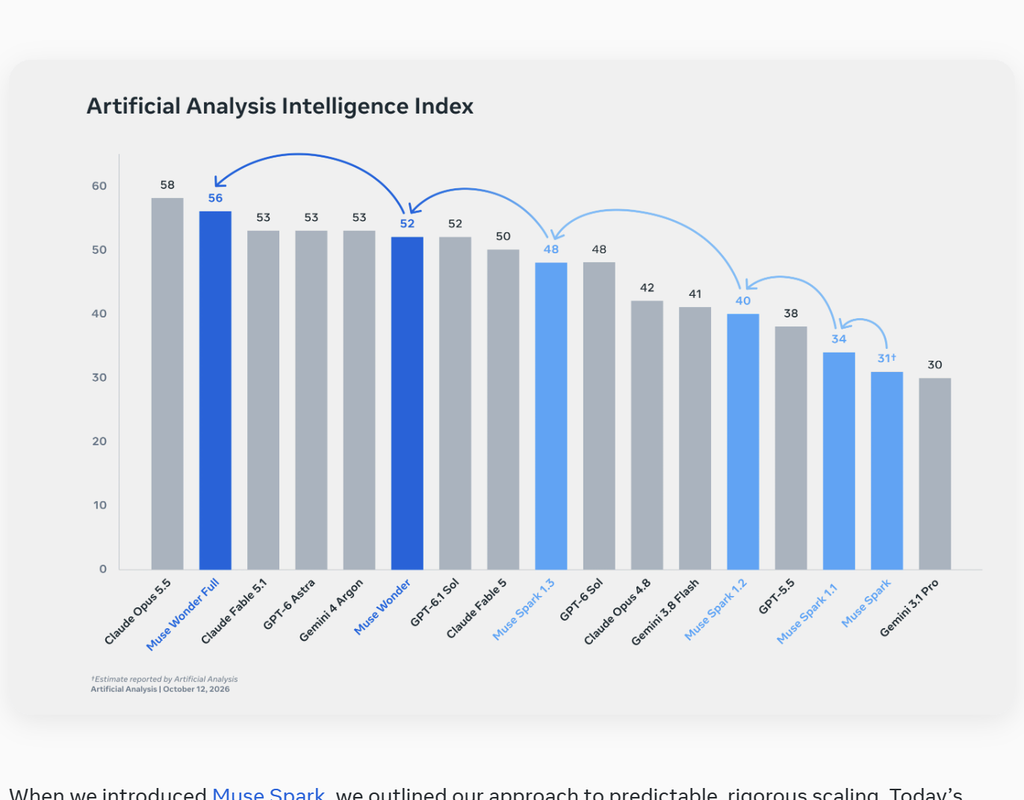
Ref: Muse Wonder Meta Announcement
Users will find the new model in Muse, Meta’s agent app. The app has no model switcher, and Meta says Muse Wonder will power it soon, starting with paid subscribers.
Takeaway: As the chart shows, the top models score within a few points of each other. Choose the tool that fits your workflow, budget and data rules, and re-check every few months as the rankings change.
Thank you for reading today’s edition.
If this issue was valuable, pass it along to a fellow business owner. I’d love to hear your feedback at natalia@nataliabrattan.com.
See you next week!
Natalia