
👋 Welcome back to AI for SME Success, your weekly dose of practical AI insights for small businesses.
Today we cover:
- New Claude for small business workflows, integrations and training
- How to use Claude’s new proposal builder skill
- Customers openly protest AI visuals
- Two low-risk AI use cases
Let’s dive in! 👇
💼 New Claude for Small Business Workflows, Integrations and Training
On September 15, Anthropic shipped its biggest update to Claude for Small Business including new and updated workflows, integrations and training.
The company released the first small business plugin in May. It has been installed more than 900,000 times since. Anthropic spent the following months after in live workshops with small business owners, gathering feedback on what to improve and build next.
The plugin has grown from 31 skills to 44. Anthropic removed 13 of the originals and added 26 new ones. The number of connectors rose from 12 to 37.
Here are the new workflows:
- Money and operations: ap-processor, pay-the-bills, payroll-prep, report-builder, report-pack, restock, inventory-planner
- Sales: crm-autopilot, speed-to-lead, lead-finder, outreach-composer, grow-pipeline, reactivate, proposal-builder
- Marketing: growth-pulse, marketing-monday, social-content-engine, ad-manager, seo-ai-visibility, review-reputation
- Admin and hiring: inbox-manager, hiring-screener, grant-rfp-writer, brand-style
- Platform: build-agent, build-connector, smb-router
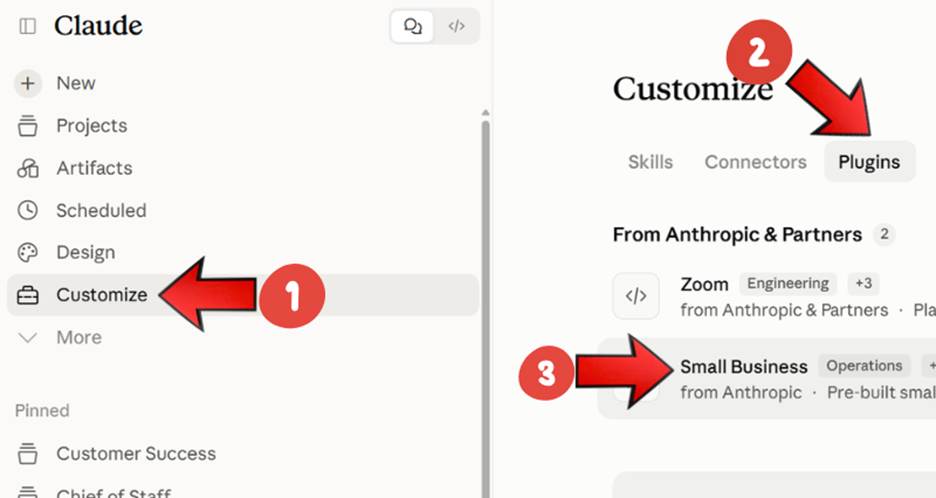
Where to Find the Small Business Plugin in Claude
Anthropic business partners are running free live webinars on their connectors from September 25 through November 17. They include TikTok, Notion, Zapier, Zoom and Atlassian.
🧾 How to Use New Claude’s Proposal Builder Skill
Proposal-builder is one of the new skills in Claude’s September 15 update.
In minutes it gives you a consistent proposal that incorporates your meeting notes, jobsite photos, rate card, and past pricing in your own template.
In minutes, it turns your meeting notes, jobsite photos, rate card and past pricing into a consistent proposal in your own template.
Here is how to use it:
- Step 1: Install the Small Business plugin, then run /smb-onboard once so Claude knows your business.
- Step 2: For an online meeting with your client, turn on transcription. For an in-person meeting, take notes by hand and photograph them later, along with any jobsite shots.
- Step 3: Review the transcript closely, especially measurements, figures and dates.
- Step 4: Run /proposal-builder. It asks where your discovery notes are. Point it to your transcript or note photos, then give it your rate card, a past proposal to match the format, and your deposit and payment terms.
- Step 5: Review the deliverable. Check every measurement and reread every section against what was said in the meeting.
🪧 Customers Openly Protest AI Visuals
The market is so saturated with AI visuals that customers have started to push back.
Customers vote with their feet. In August, the Ottawa Citizen found Ottawans crowdsourcing lists of restaurants to avoid over suspected AI images. BlogTO covered CNE food posters drawing commenters who pledged not to buy from any stand using them. In September, the Minnesota Star Tribune profiled customers who quietly stopped shopping over visible AI use. Back in July, LADbible reported that in the UK an AI poster alone is enough to keep people away.
The pushback turns personal and physical. In September, Internewscast reported that San Francisco Cafe Grind & Unwind put AI food images in its windows and someone spray-painted them. Business Insider reported that the owner of Penny’s Coffee Shop lost some followers and receive a wave of angry messages over one ChatGPT menu. The Nerd Stash reported criticism of Albany’s Dove and Deer escalating into hostile replies and an alleged personal attack.
Businesses are now banning AI visuals. On August 30, CBC reported that Halifax’s Gus’ Pub has banned AI event posters, and a week earlier CBC profiled a Nova Scotia radio host designing posters free to keep community groups off AI. Around the same time, the BBC reported that Belfast’s American Bar has boycotted AI across the pub and its social media. A Derry card maker refused to print customers’ AI-made greeting cards. 404 Media reported on businesses go viral for making signs without AI.
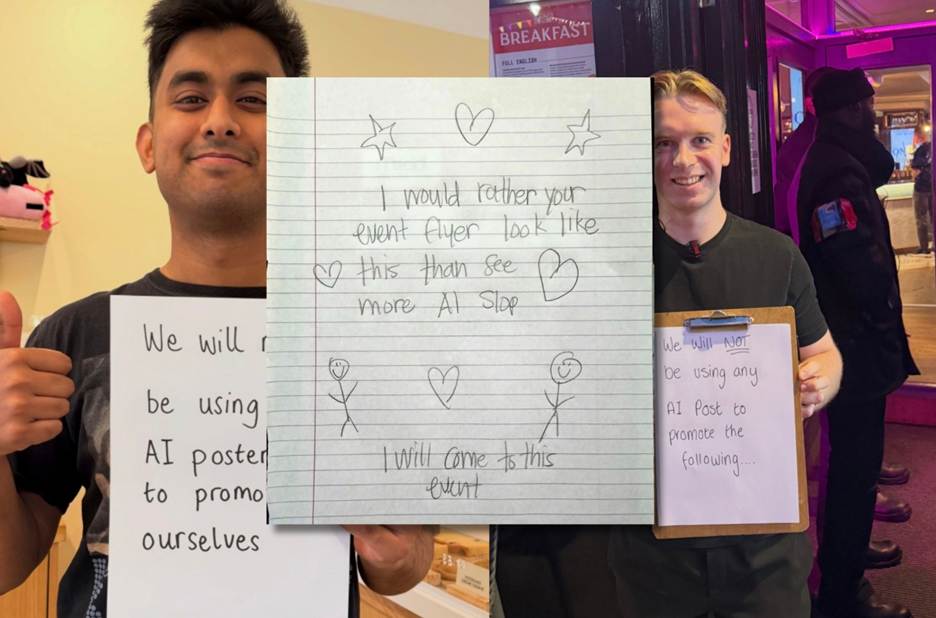
Source: Businesses Go Viral for Making Signs Without AI. 404 Media.
Takeaway: Many customers can now spot AI-generated images and dislike them. Step back from posting fully AI-generated visuals. If you use AI, use it on part of an image, not the entire thing.
✅ Two Low-Risk AI Use Cases: Inventory Intake and Recall Reminders
A boutique optical shop reports roughly a 20% revenue increase, helped in part by moving two routine tasks onto AI, according to a profile published by Verizon on September 10.
The shop owner credits the gain to customer retention work she learned through a free training program, and AI was one piece of that.
Here is how she uses AI:
- Inventory intake. When a shipment of frames arrives, she photographs the SKU numbers and has AI generate the inventory spreadsheet in seconds. The output is checkable in about thirty seconds by matching the row count to the packing slip and spot-checking a few SKUs, and any error that slips through is cheap to fix.
- Recall reminders. Annual checkup reminders moved off manual spreadsheets onto an automated platform, saving about three hours a month and bringing existing clients back through the door. Who gets contacted is a date rule running over her own customer records, and the message body stays a fixed template with merge fields, so there is nothing left for the AI to get wrong.
Takeaway: Both are good examples of profitable, low-risk AI use. The work is routine, the output is verifiable against something you already have, and mistakes are easy to spot and cheap to fix.
Thank you for reading today’s edition.
If this issue was valuable, pass it along to a fellow business owner. I’d love to hear your feedback at natalia@nataliabrattan.com.
See you next week!