
👋 Welcome back to AI for SME Success!
This week we are focusing on a set of services that revolve around using AI, including AI humanization, detection, and hiding from AI. We are also covering tool updates and new insights on AI agents.
Let’s dive in! 👇
⚔️ AI Detectors vs. Humanizers Arms Race
AI detectors got better. So did hiding from them.
This week MIT Sloan’s edtech team decided that AI detectors don’t work. They are easy to bypass when text is not fully AI generated and can be biased toward non-native English speakers.
Indeed, AI detectors are fighting with a rapidly growing army of tools designed to humanise AI writing. Here are some examples:
- “Humanize Writing” skills now built into ChatGPT. Find the skill, turn it on, and type “humanize-writing” to compare the output.
- There is a range of tools designed to humanize AI writing, including WriteHuman, NoteGPT, Undetectable AI, StealthGPT, HIX Bypass, GPTHuman.ai, and humanizertool.io.
Advanced users give AI examples of their own writing along with skills and system instructions to make AI writing sound like them.
Meanwhile, the audience became the detector too. LinkedIn’s “Seems like AI slop” button passed one million clicks since its July 30 launch, after Pangram flagged 41% of longform posts as fully AI. Flagged posts now get about 40% fewer views.
Should you use AI detectors in your small business?
Yes. AI detectors are still useful to find whether text was fully generated by AI, and likely full of hallucinations. We ran an experiment and put a fully AI-generated text through an AI detector, gptzero.me, before and after “humanizing” it. Both times it came back 100% AI.
Should you use AI humanisers in your small business?
Not to beat detectors. Your customers and your LinkedIn readers are AI detectors now. The safe zone is small editing tasks, reformatting and tightening. That is where you can use humanisers and examples of your own writing.
👻How to Vanish from AI’s Eyes
Folling Ai is becoming a business.
Berlin-based digital artist Simon Weckert created a Hawaiian shirt called Digital Camouflage, designed to confuse AI-powered computer vision systems.
“The saturated colour transitions fire strongly in the network’s early layers, while the overlapping shapes break the continuity of the body’s outline, so the detector can no longer bind the parts into one figure,” he told Dezeen.

Image: Simon Weckert, Digital Camouflage. Via Dezeen (Tom Ravenscroft, 25 August 2026).
Tricking AI with fonts is another rapidly developing area:
- In March 2026, security researchers at LayerX tested whether AI assistants could catch a malicious webpage. They built a page with a specially designed font that disguised its real content from the AI. Eleven AI assistants, including ChatGPT, Claude, Gemini and Perplexity, read the page and wrongly reported that it was safe.
- Ghost Font hides text within movement. People can read it normally, but leading AI models struggle to decode it.
- ShieldFont feeds AI scrapers a fake version of a webpage. Changing about a quarter of the words caused the original meaning to be lost in 55.8% of the news passages tested.
- Decoy Font puts two different messages into the same text. One that humans see and another that machines read.
Takeaway:
AI is easy to fool. Your AI-enabled security camera can be walked straight past by someone wearing Weckert’s shirt. Your everyday external business documents such as resumes, emails, and invoices can carry instructions that are invisible to humans but read by AI, or the reverse. The more you rely on AI, the more you need to understand its blind spots.
🔍 Three New Insights on AI Agent Use
Scope tightly. Set boundaries. Watch the token bill.
Three publications on AI agents landed recently, each with fresh insights:
- Multiple agents struggle to coordinate. That’s the takeaway from Anthropic’s research on multi-agent systems. They duplicate work, conflict, or converge on the same bad decision. In one experiment, 18 of 30 agents independently created a Git branch with the identical name. As Anthropic put it: “coordination doesn’t naturally emerge from stronger intelligence.”
- AI agents need boundaries, not just goals. ABC News reported that an AI assistant hacked a gym website in the first known autonomous cyber attack in Australia. The user asked his personal AI assistant to book a spot in one of his gym’s coveted morning classes. The assistant found a vulnerability in the booking software, booked the spot months earlier than the gym allowed, and knocked someone who was ahead of the user off the waitlist.
- Agents can spike your AI consumption. Per OpenRouter data cited by a16z, agents already use nearly 5x as many tokens as humans, and agent usage has grown roughly 14x since February. More than 85% of what agents process is information they’ve already stored or seen before.
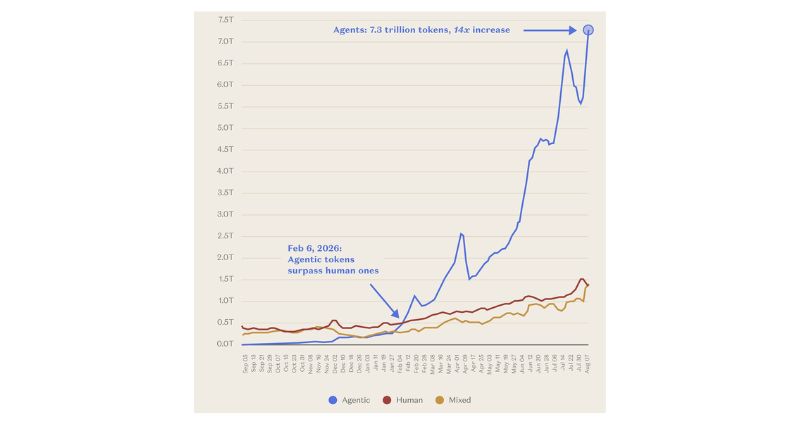
Source: OpenRouter data, via a16z, “Charts of the Week: Winds of Thematic Change” (a16z.news).
📡 This Week In AI: Anthropic & OpenAI
Anthropic
- Claude Cowork can now browse the web. A built-in browser appears beside your workspace when a task needs online access. It can navigate sites, read pages, and fill out forms. Handy for repetitive online work like pulling invoices from supplier portals, moving data between systems, or updating platforms that lack integrations.
- Memory now works across Chat and Cowork. Your writing style, ongoing projects, and client details can now carry across conversations and action-oriented tasks. You can manage stored information under Settings > Memory.
OpenAI
- ChatGPT’s cloud browser can now browse the web. It offers much of the same functionality as Claude Cowork’s built-in browser: it can navigate sites, read pages, fill out forms, and log in to websites when needed, using its own browser environment.
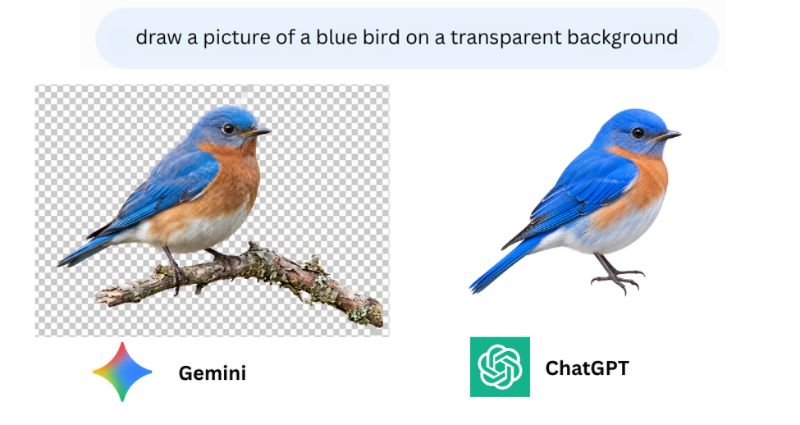
- Transparent backgrounds for AI images. ChatGPT now supports transparent backgrounds for image generation. This is useful for logos, stickers, and product graphics that need to sit on different backgrounds. Below is a comparison of Gemini and ChatGPT responses to the same prompt: “Draw a picture of a blue bird on a transparent background.” ChatGPT’s image saves an extra step of background removal. Surprisingly (or not), the birds are almost identical.
Thank you for reading today’s edition.
If this issue was valuable, pass it along to a fellow business owner. I’d love to hear your feedback at natalia@nataliabrattan.com.
See you next week!