
PLUS: How Accurate AI Answers Are from Memory vs. Sources, and What Small Businesses Can Learn from Microsoft’s AI Rollout
👋 Welcome back to AI for SME Success, your weekly dose of practical AI insights for small businesses.
Today we cover:
- Meta’s Muse – new free AI agent for small business
- How accurate AI answers are from memory vs. sources
- What small businesses can learn from Microsoft’s AI rollout
Let’s dive in! 👇
💼 Meta Muse – New Free AI Agent for Small Business
Meta launched Muse for Small Business on September 29. The app has held the top spot on Apple’s free app chart in the US and Canada.
Muse’s unique business advantage. Muse works much like its two counterparts, Google’s Gemini Spark, announced on May 19 and ChatGPT’s Dots, launched on September 29. The big difference is price. Muse is free with a usage limit. Dots require a ChatGPT Pro or Business Premium plan, and Gemini Spark requires a Google AI Pro or Ultra plan.
Similar to Meta AI, Muse has native access to your Instagram, Facebook, and Meta Ads accounts. Unlike Meta AI, Muse connects to other small business tools, including QuickBooks, Shopify, Stripe, and Slack. Also, unlike Meta AI, Muse executes business tasks. Muse runs on its own computer with memory. It carries work across days, works on a schedule, and keeps files you reuse. For example, Muse can prepare a set number of outreach emails every morning and track them in a spreadsheet. You can also invite your Instagram or Facebook friends to collaborate on a task.
When to choose Muse. Choose Muse when your day lives where customers find you, not where files live. If your core loop is Shopify orders, Stripe transactions, and QuickBooks expense checks, plus customer messages on Facebook and Instagram, plus ad drafts from your Meta ad accounts that wait for your approval, Muse handles that whole loop in one chat, with persistent memory, scheduled tasks, and an “Ideas” tab that suggests what else it can take on.
How to use Muse. Muse.ai is available in the U.S. and Canada only. It has its own app, Muse from Meta, in the App Store and on Android, and it works on your computer and your phone. Download the app or open muse.ai, log in with your Facebook or Instagram account, and connect it with your small business apps.
Example of use: Luxe Shoetique, a one-person women’s clothing shop, had Muse review its social media accounts and rewrite its brand guidelines, a task that draws on Muse’s native connection to Instagram and Facebook business accounts.
🧠 How Accurate AI Answers from Memory & Sources
Even the best AI gets 25% of answers wrong without search.
How often does AI answer from memory? Quite often. According to 2026 studies from Semrush and cloro, AI answers about 65% of queries from memory instead of searching the web. For general-knowledge questions, that rises to roughly 99%. Unless you specifically ask it to look things up and cite its sources, most of what you get is a memory-based answer.
How accurately does AI answer from memory? Less accurate than expected. The latest Artificial Analysis benchmark, published at the end of September, tested how well 565 AI models answer hard questions from memory.
Here is a summary for the Claude and ChatGPT models on paid and free plans, plus the latest Gemini model 4 Argon and Muse Spark.
Accuracy is the share of all questions answered correctly (higher is better). Hallucination rate is how often the AI gave a wrong answer when it should have said “I don’t know” (lower is better).
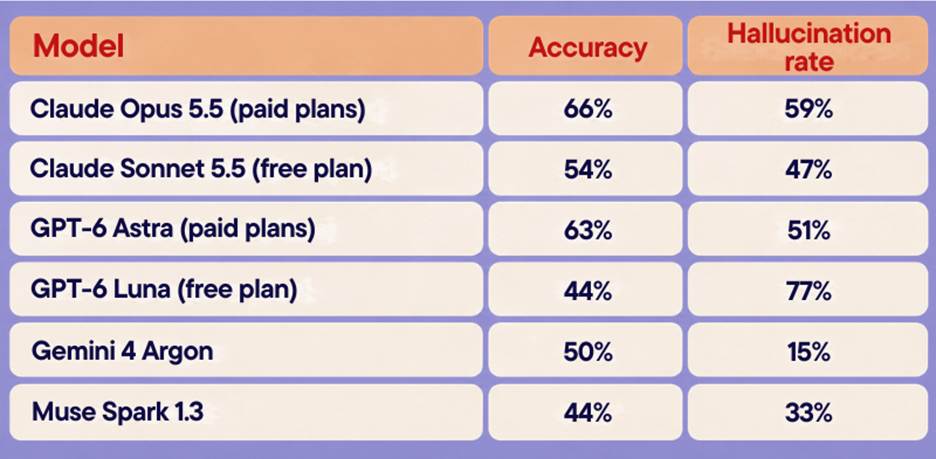
Summary based on selected data from Artificial Analysis benchmark.
How accurately does AI answer from sources? Accuracy improves, but it introduces new kinds of errors, mostly picking the wrong source, and sometimes misreading it. A 2026 Stanford study found that chatbots are fairy accurate when they lands on right sources. More than 70% of their errors come from retrieving the wrong one.
Takeaway: When chatting with AI, keep in mind that it bluffs a lot. For anything that matters, ask AI to search and quote its sources, check that the source fits your case, and keep unconfirmed details out of your question.
Want fewer AI mistakes in your work? Join my free webinar tomorrow, October 8: AI for Small Business: Reduce AI Hallucinations & Get Better Results
💡 What Small Businesses Can Learn from Microsoft’s AI Rollout
Earlier in September, Microsoft shared the lessons they learned from rolling out AI to thier own employees. Here are five insights, with examples relevant to small businesses.
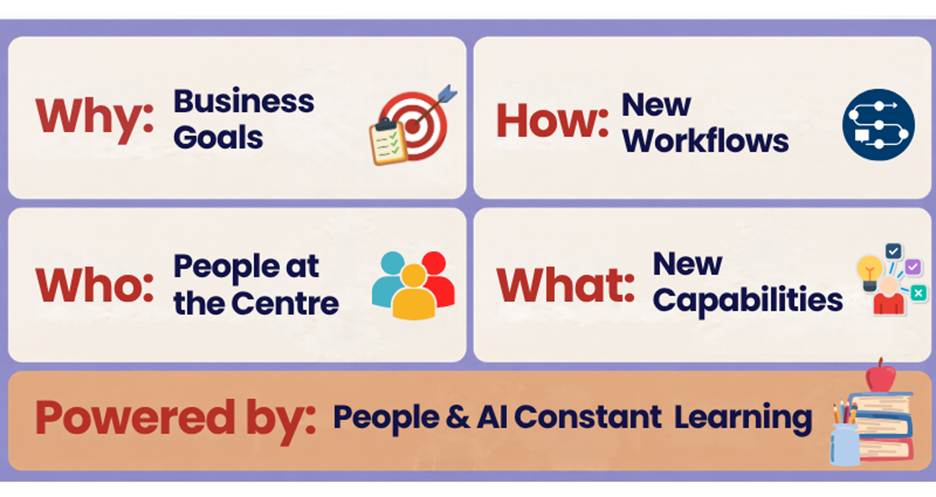
Summary of lesson learned published by Microsoft.
- Start with business goals.
Instead of deploying AI tools, map how you and your team spend your week and identify where AI can help you reach your business goals.
For example, a bookkeeper who loses hours each week chasing client documents would start with automated reminders, not an AI writing assistant.
- Redesign workflows.
Instead of adding AI to existing steps, decide what AI can access and do, and where a person must check, approve or step in.
For example, a video editing process becomes a sequence of AI steps and editor steps.
- Put employees at the centre.
Instead of rolling AI out to your employees, tell them why you are doing it and give them a say in what changes.
For example, a receptionist knows that rebooking cancelled appointments eats her mornings, so that is the first task the team hands to AI.
- Expand what people can do.
Instead of using AI only to save time, ask how people and AI together can achieve results that used to be out of reach.
For example, a retailer with no coding skills builds a simple reorder tracker that warns her before the best sellers run out.
- People and AI learning together.
Instead of only training people to use AI, build a routine where people and AI both improve from experience.
For example, a contractor’s office keeps a shared file of the prompts and corrected drafts that worked, so each new estimate starts from the best previous one.
Thank you for reading today’s edition.
If this issue was valuable, pass it along to a fellow business owner. I’d love to hear your feedback at natalia@nataliabrattan.com.
See you next week!
Natalia