
👋 Welcome back to AI for SME Success, your weekly dose of practical AI insights for small businesses.
Today we cover:
- AI lessons from 1,000 small businesses
- AI still lies a lot
- This week in AI: OpenAI & Google
- How to set up “Your Writing Voice” in ChatGPT
Let’s dive in! 👇
💡 AI Lessons From 1,000 Small Businesses
Anthropic ran half-day workshops with roughly 1,000 small business owners and published what it learned.
Most participants employed 5 to 50 people in construction, manufacturing, logistics and trades. Practical takeaways:
- Aim AI at operations. The real business value of AI comes not from chatting, but from putting it to work in operations. As one founder put it: “I’ve used AI models for years, but it wasn’t until skills and connectors came along that I found real use cases in my actual work.”
- Half a day of training is enough to start. Guided practice moved owners beyond using a chatbot to using AI in operations. The CEO of a 30-person manufacturer said, “You were able to help me do the things I was scared of doing.”
- Give the neglected work to AI first. Every small business has work that never gets done because no one can justify the hours: small invoice errors, messy filings, reconciliations nobody chases. The bar there is low and the stakes are small. AI can beat nothing being done at all. Thus, a five-person Tennessee trucking compliance shop took its fuel tax filing error rate from 7% to zero.
- AI can give SMEs skills they never had. A trailer manufacturer built a reconciliation tool in about 15 minutes, a painting contractor had Claude read PDF blueprints floor by floor to prep bids, and technicians outside Dallas now photograph an unlabelled part and get an answer in seconds instead of hours.
- Strong controls are essential. A painting contractor caught an error in a bid calculation and now tells Claude to “show me your work” every time. A blinds manufacturer has Claude flag when it is “assuming versus knowing.”
🤥 AI Still Lies a Lot
Overreliance on AI is becoming widespread and leads to critical mistakes.
In early September, three hikers set out to summit Mount Shasta in northern California, having planned the trip with Google’s Gemini. Forest Service climbing rangers found them the next morning, ABC News reported. Officials said Gemini had told them to carry far less food and water than the group needed. Overreliance on AI was a “critical misstep.”
Over the past few months, the legal system has produced a steady stream of similar examples of overreliance on AI. On September 11, 2026, the New Mexico Supreme Court fined a defence lawyer $5,000 for a brief in which ChatGPT invented witnesses and their testimony. A Manitoba appeal court dismissed a foreclosure appeal in July 2026 after finding it cited case law that does not exist. Quebec’s Superior Court overturned an arbitral award because the arbitrator himself relied on four fabricated decisions. State Farm’s defence firm admitted to seven nonexistent citations across eight filings.
Takeaway. These recent cases serve as a reminder to separate the low-risk uses of AI from the high-risk ones. In low-risk uses like narration, dictation, transcription, graphics, formatting, and summarizing your own work, AI hallucinations are immaterial. In high-risk uses, it makes sense to verify every single line of AI output.
📡 This Week In AI: OpenAI & Google
OpenAI
- Data Agent. OpenAI’s new Data agent in ChatGPT Work lets users connect approved company data sources, ask questions in natural language, investigate trends, create interactive dashboards and take approved actions. Use Case Example: A business owner who has been exporting sales reports every month asks the Data agent which accounts have reduced their order volumes since June. The agent can investigate what changed, build an interactive dashboard and recommend who to call first.
- Your Writing Voice. OpenAI launched a new Writing Style feature that can use examples from connected apps such as Gmail, Slack and Google Drive to help ChatGPT write in your voice. Use Case Example: A business owner connects Google Drive containing previous proposals and uses ChatGPT to draft a new proposal that reflects the language and style of their existing work.
- Custom Instructions. Gemini’s custom instructions now work across Drive, Chat, Gmail, Slides and Sheets, allowing users to save preferences for style, tone and formatting instead of repeating them in every conversation. Use Case Example: A photographer saves instructions describing her studio, clients and preferred writing style. Gemini can then use those preferences when drafting enquiry responses, presentations and other content across Workspace.
- Gemini Task Coordination. Gemini can coordinate tasks across Google Workspace, including creating Docs and Sheets, scheduling meetings, resolving calendar conflicts, and creating Google Tasks. Use Case Example: A contractor receives a quote request in Gmail. Instead of switching between apps to prepare an estimate and schedule a site visit, he asks Gemini to help create the estimate and find a suitable time for the visit.
✍️How to Set Up “Your Writing Voice” in ChatGPT
- Open the Personalization settings. In ChatGPT, select your profile picture, open Settings, and choose Personalization from the left-hand menu.
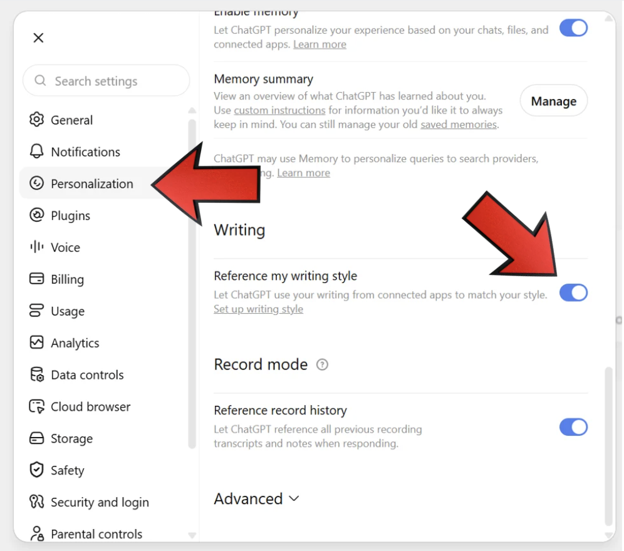
How to find “reference my writing style” in ChatGPT settings.
- Enable writing-style matching.
- Choose your writing sources:
- Messaging for shorter, conversational writing from apps such as Slack
- Documents for proposals, reports and other long-form writing from Google Drive or Notion
- Email for your natural email style from Gmail
- Activate the style. Once the desired sources show Connected, select Use writing style at the bottom of the setup window.
- Use your style. Prompt example: “Draft an 800-word proposal for a prospective bookkeeping client using my writing style. Use the project details below, but match the tone, structure and level of formality found in proposals I have written in Google Drive.”
Thank you for reading today’s edition.
If this issue was valuable, pass it along to a fellow business owner. I’d love to hear your feedback at natalia@nataliabrattan.com.
See you next week!