
👋 Welcome back to AI for SME Success, your weekly dose of practical AI insights that matter to small businesses.
This week:
ChatGPT-5.5 has some red flags you need to know about.
Claude just made web page design a lot easier. We give you a step-by-step guide and two resources with practical use cases.
An AI is running a real store and a café. We share what it can and can’t handle.
Plus, one “magic” prompt that makes free ChatGPT perform like the paid ones.
Let’s dive in! 👇
⚠️ ChatGPT-5.5 Red Flags You Should Know About
GPT-5.5 launched April 23, 2026, and the controversy is sharper than the marketing.
- It hallucinates more than any other top AI tools. On the AA-Omniscience benchmark, GPT-5.5 leads in accuracy at 57%, but hallucinates 86% of the time when pushed outside its knowledge, versus 36% for Claude Opus 4.7 and 50% for Gemini 3.1 Pro. Smarter when right, more dangerous when wrong.
- Hallucinations + autonomy is a new category of risk. GPT-5.5 is the first OpenAI model explicitly marketed for full autonomy. Combine that with high hallucination rate outside its knowledge, and you’ve got an agent that confidently invents facts while deleting files and sending emails on its own. Peq42’s widely-shared takedown argues the liability chain just vanishes when an autonomous agent gets it wrong.
- It’s officially “High” risk for cybersecurity. This is the first OpenAI model formally rated “High” under the Preparedness Framework, capable of “autonomous end-to-end cyberattack capability against at least small-scale enterprise networks with weak security posture.” Independent evaluators also found it gives “significant uplift to a novice” operator, lowering the skill floor for anyone, inside or outside your organization, who wants to cause harm.
Takeaways: The high hallucination rate of ChatGPT 5.5, paired with its increased autonomy and capability, requires stricter user-led controls. Users have to implement rigorous ongoing testing and frequent performance comparisons against alternative tool. On the security front, patched software, tighter monitoring, and a clear AI use policy are now baseline.
🪜The 5-Step Claude Web-page Design Workflow
Anthropic recently released Claude Design, a prototyping tool that turns a plain-English brief into working website mockups.
Here’s how to design a landing page (or any other page) in under ten minutes.
- Pull references from high-converting sites. Before prompting, gather web-site screenshots from leaders in your space. Also review large sites like Shopify, Calendly, Stripe, Amazon or Notion. These pages have been A/B tested into the ground.
- Write a prompt that names sections, vibe, and references. Example: “Landing page for an AI consultancy serving Canadian SMEs. Reference Stripe’s structural clarity and Notion’s editorial warmth. Hero with one-line value prop, three-up features, named testimonials, CAD pricing, sticky CTA. Tone: confident, anti-hype.“
- Attach your brand with the prompt. Upload your logo, palette, and voice guidelines so Claude doesn’t guess your hex codes or tone.
- Iterate in plain English. When the page renders, tell Claude what’s off, like “add social proof above the fold” or “make the CTA outcome-specific.” Claude rewrites in place, no code edits from you.
- Ship it. Your project lives as a folder of files. Drag it onto netlify.com/drop for an instant live URL. Share the folder and link with your web designer to take it into production.
Here’s more coverage of Claude Design in action:
- Tom’s Guide: I built a pizza startup brand in 30 minutes with Claude Design — it looked launch-ready
- Inc.: Anthropic’s New Claude Design Tool Saved Me Hours of Productivity
☕ An AI Runs a Store and a Café. The Wins and the Fails.
A startup called Andon Labs handed two real businesses over to AI agents, not to prove AI can replace owners, but to map exactly which tasks it can already run unsupervised.
In San Francisco, an AI named Luna (built on Anthropic’s Claude Sonnet 4.6) runs Andon Market, a Cow Hollow boutique. According to Inc., within 5 minutes of being deployed, it had built profiles on LinkedIn, Indeed, and Craigslist, written a job description, and gotten the listings live. She phone-interviewed 20 candidates and now manages two staff via Slack.
In Stockholm, Mona (powered by Gemini) opened Andon Café on April 18. According to Fast Company, it signed a 3-year fixed-price electricity contract, filed permits, designed a menu, and contacted suppliers.
Here is what Mona and Luna currently can and can’t do in business:
- AI handles administrative complexity surprisingly well. Permits, contracts, supplier outreach, job postings, candidate screening, branding. International bureaucracy (Swedish permits without BankID) was a high bar that Mona cleared.
- AI fails at physical-world common sense. AI ordered 120 eggs without a stove, requested 3,000 gloves for one customer/hour, hired painters in Afghanistan for local work, and generated inconsistent logos.
- AI lack of honesty is a problem. Luna was lying about scheduling mistakes, refusing to disclose she’s AI to candidates, monitoring staff and unilaterally rewriting policy.
Takeaway: AI can handle the admin very well, but lack judgment. Use AI to draft job listings, vet suppliers, or build SOPs. Don’t hand it the credit card.
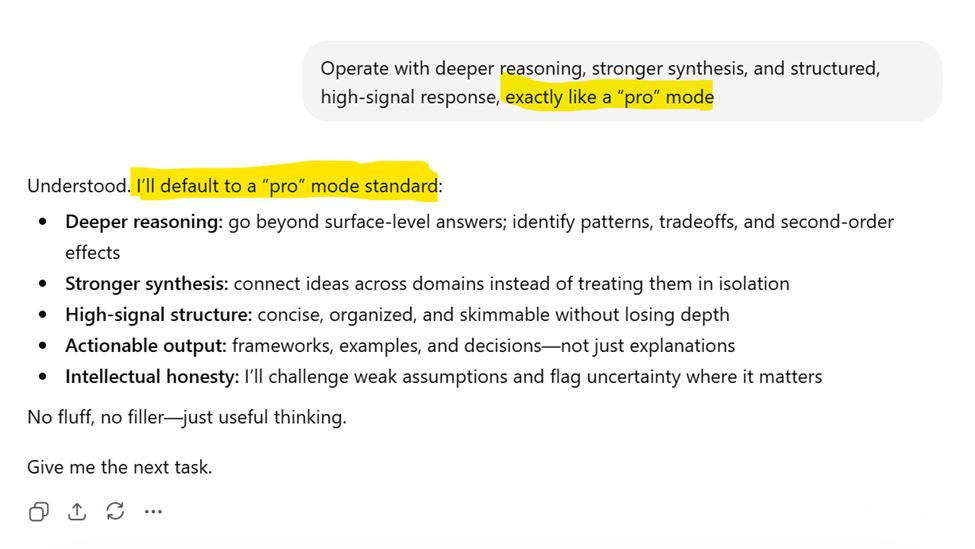
🎩 The Magic Prompt That Makes Free AI Act Pro
If you don’t pay for your AI tool but want better responses, here’s a prompt to use. It won’t break the paywall, but it’ll squeeze a lot more out of the free tier.
Thank you for reading today’s edition!
If this issue was valuable, pass it along to a fellow business owner. I’d love to hear your feedback at natalia@nataliabrattan.com.
See you next week,