
👋 Welcome back to AI for SME Success, your weekly dose of practical AI insights that matter to small businesses.
This week:
- How to use the new Claude plugin for small business owners.
- Google’s new official guide on how AI search works now, and how to rank in it.
- AI hallucination statistics 2026. The one move that drops the rate from 88% to 2%.
- The unexpected way a pharma giant CEO uses AI to make big decisions.
Let’s dive in! 👇
🔌Claude for Small Business Plugin
15 workflows for running a small business.
Small businesses don’t lack software. They’re overwhelmed by it. Between QuickBooks, PayPal, HubSpot, Canva, DocuSign, and suites like Google Workspace or Microsoft 365, business owners spend hours manually stitching disconnected tools together. Claude for Small Business puts AI inside the tools SMEs already depend on daily.
Anthropic shipped Claude for Small Business on May 13. Five days later it has passed 610K installs, up from roughly 500K just a day earlier.
The plugin includes ready-to-run skills across finance, operations, sales, marketing, HR, and customer service (payroll planning, month-end close, invoice chasing, contract review, lead triage, campaign builds, and more), plus 12 connectors including QuickBooks, PayPal, HubSpot, Canva, DocuSign, Slack, Stripe, and Square.
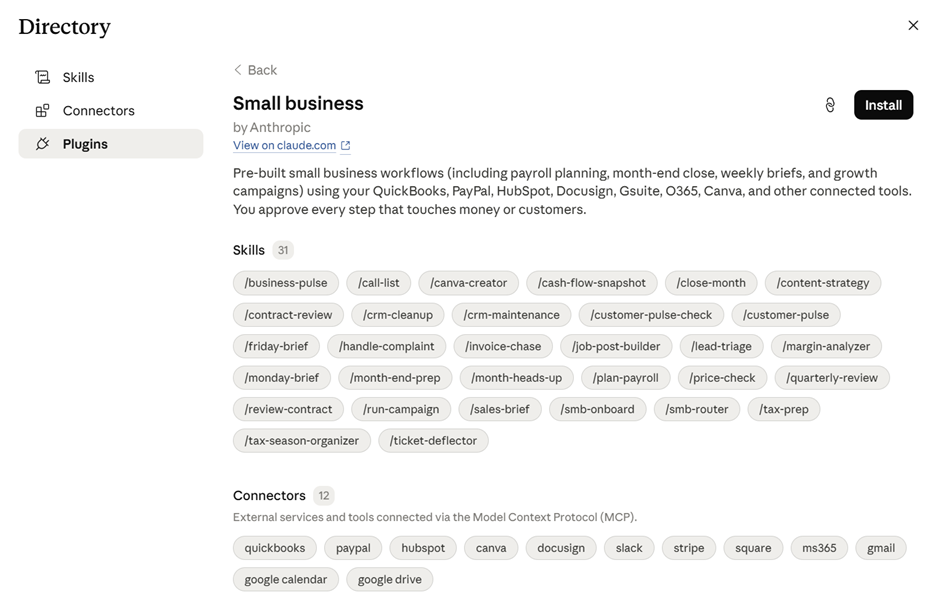
Screenshot of Claude’s new Small Business plugin in the directory. Source: claude.com
This is a complementary, one-click plugin that runs exclusively on Claude’s desktop app, not the web version. It is available only to paid users. You can access it using this link or go to Cowork-> Customise->Browse Plugins->Small Business.
If setup feels daunting, Anthropic has a step-by-step install tutorial that walks you through your first workflow. In addition, there is a free AI Fluency for Small Business course.
Here is a step-by step guide on how you can use one of the skills, Contract Review :
- In Claude Cowork, connect DocuSign (or Google Drive if your contracts live there) with one click.
- Upload the contract or point Claude at the Drive file or DocuSign envelope.
- Describe what you want in plain English: “Review this contract. Flag risky clauses, missing terms, key dates, and my obligations.” A router picks the right workflow.
- Claude returns a clause-by-clause summary with red flags and questions to raise.
- Nothing gets signed or sent until you approve it.
🔍Forget Keyword Optimization. New Google’s AI Guide, Decoded.
Google Search Is Getting Smarter with AI. What It Means for You.
On May 15, Google published its first official guide on optimizing websites for AI Overviews and AI Mode. Most of it restates baseline SEO, but it adds new AI-specific insights, which we cover below.
What’s new:
- Keywords: Still relevant, but as topical anchors, not strict mandates. They signal your topic to the AI. You no longer need to force unnatural phrasing or capture fifty linguistic variations.
- Unique voice: Google now uses AI to detect whether your content offers a genuine perspective or just restates generic information available elsewhere. It doesn’t matter whether AI helped you write it. Google contrasts generic content like “7 Tips for First-Time Homebuyers” with a unique voice like: “Why We Waived the Inspection & Saved Money: A Look Inside the Sewer Line.”
- Visuals: Google’s AI pulls relevant images and video into responses. Quality and relevance matter, so follow image SEO and video SEO best practices.
Myths Google dispels:
- Special markup: Not needed. Google already indexes many file types.
- Chunking content: Unnecessary. Google understands multiple topics per page. There’s no ideal length.
- Rewriting for AI: Skip it. AI grasps synonyms and meaning.
- Inauthentic mentions: Ineffective. Ranking favors high-quality content.
- Overstructured data: AI search doesn’t depend on it.
Takeaways: Exact-match keyword optimization has lost its edge. Original, high-quality content backed by strong visuals matters more than ever, and AI assistance in creating it is fine. Google’s AI capabilities now make genuinely useful content easier to surface.
🌀 AI Hallucination Statistics 2026
Task choice alone moves AI hallucination from 2% to 88%.
Two new reports, SQ Magazine’s LLM hallucination statistics 2026 and Stanford HAI’s AI Index Report 2026, landed weeks apart, and together they tell one story: AI capability is climbing, accuracy is not keeping up.
SQ Magazine reports hallucination rates between 50% and 82% depending on model and prompting method. For legal queries across major models, research cited in the report puts the rate at 58% to 88%.
Model performance depends heavily on the task. Below is the chart from SQ Magazine’s article, hallucination rates by task type. The range runs from 2% to 88%.
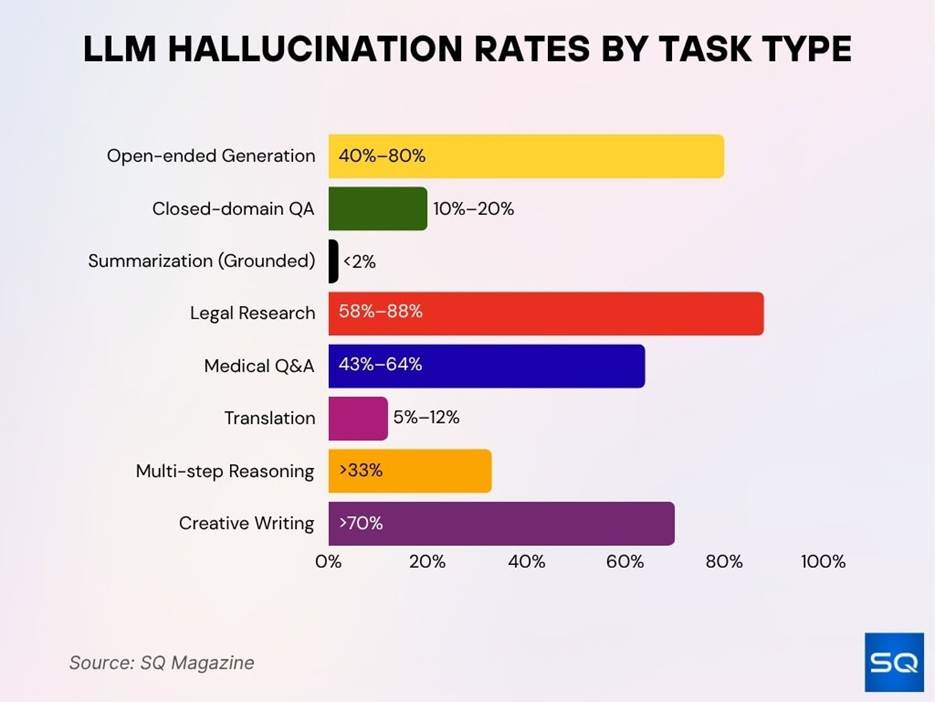
Source: SQ Magazine
SQ also reports 62% of users trust AI outputs without verification in early interactions, and only 27% consistently fact-check what AI produces.
The takeaway: models are improving, but the hallucination floor is still very high. Task selection is the lever you control, and it matters a lot.
💡 The CEO AI Decision-Making Trick
Let your AI tools critique each other.
On a recent episode of The 1 on 1 with CNN, Albert Bourla, CEO of Pfizer, and Julie Sweet, CEO of Accenture, sat down to talk leadership, AI, and what comes next.
Bourla said he still calls trusted people for big decisions. However, now he adds AI:
“Claude gives me an opinion, and I take it and I put it in Gemini, and I ask, what do you think about what Claude said? Or ChatGPT said. And you don’t have to worry about someone being offended that you asked for a second opinion!“
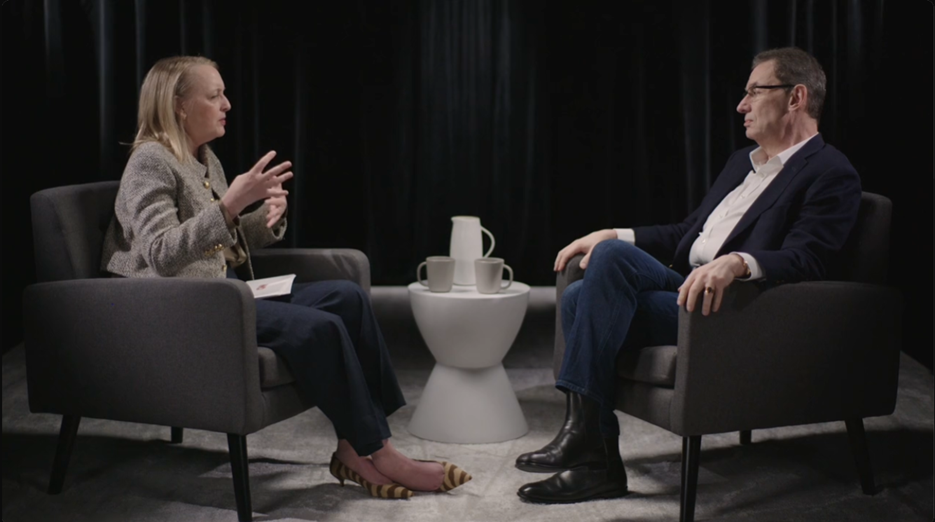
The one-on-one with the Pfizer and Accenture CEOs. Source: CNN.
That’s the CEO of a pharma giant running a model-on-model peer review before breakfast.
Sweet’s approach to AI is more grounded. She told Fast Company that AI proficiency is now required for promotion at Accenture. Her logic: unlike the shift to the cloud, AI isn’t just infrastructure you can hand to IT. Leaders have to understand it.
Takeaway: If you use multiple AI tools, let one critique the other’s take on important calls. Or ask the same tool to argue against itself.
Thank you for reading today’s edition!
If this issue was valuable, pass it along to a fellow business owner. I’d love to hear your feedback at natalia@nataliabrattan.com.
See you next week,