
👋 Welcome back to AI for SME Success, your weekly dose of practical AI insights that matter to small businesses.
Today we cover:
- How to tell if a document is AI slop
- Key takeaways from five recent reports on the state of AI
- AI tool updates from Meta, Anthropic, Microsoft, and Google
- How to keep Claude Design on brand
Let’s dive in! 👇
🕵️ How to Detect AI Slop (Like This KPMG’s AI-Written Report)
Detecting AI is easy with the right tools.
Last week I covered the court case where lawyers on both sides were disqualified after filing AI hallucinations. The control I recommended then was an AI supplier policy.
Today I am covering an even more striking case and recommending stronger controls.
KPMG, one of the Big Four, published a report titled “Total Experience: Redefining Excellence in the Age of Agentic AI” that was full of AI hallucinations.
GPTZero’s investigation found that of the report’s 45 citations, only five pointed accurately to a real source. Another 28 paraphrase titles or invent components for a source that does exist, and the final 12 are too vague or flawed to verify at all. Around half of the claims tied to those citations appear fake or misattributed, likely an AI research tool over-complying with a request to find examples of agentic AI in the wild.
GPTZero is a tool for detecting AI-generated text. Paid plans run roughly $14 to $27 CAD per month. Similar tools include copyleaks.com and originality.ai.
I ran my last newsletter through GPTZero. Happy to report it came back human-written (me!), with a little AI help. I select and review every source myself.

Results of GPTZero’s review of my last week’s newsletter
Takeaway: AI is everywhere now, and AI slop can seriously damage your business. Add an AI detector to your toolkit and use it whenever quality and accuracy matter.
📝 Insights from March – May Surveys on AI
What SMEs can learn from the adoption of AI by large companies.
Here are insights from March to May 2026 surveys relevant to small businesses:
- AI Stratagems Agentic AI Statistics 2026 (May 2026): while 79% of organizations have adopted AI agents, only 11% have deployed them into production. Most agents (88%) never make it to production, but those that do achieve a 171% ROI.
- McKinsey State of AI Trust 2026 (March 2026): as AI adoption expands, 74% of respondents see inaccuracy and 72% identify cybersecurity as major risks.
- Sinch AI Production Paradox 2026 (May 2026): 84% of teams spend half their time on safety infrastructure, as most firms prioritize AI trust, security, and compliance before investing further in development.
- Deloitte Private Company Outlook 2026 (April 2026): data quality and availability (72%) remain the biggest obstacles to unlocking AI value, and larger companies ($500M+) are significantly more likely to achieve moderate or significant ROI (64%) than companies under $500M (11%).
- NVIDIA State of AI 2026 (March 2026): large companies lead AI adoption.
Takeaway: Large companies are going full speed toward AI automation. They have large teams responsible for profitable (accurate and safe) AI deployment. Top priorities are accuracy, data readiness, cybersecurity, and compliance. With all the effort, large companies could get only a small percentage of automations right. Small businesses have no spare hours to design and police a hundred half-built AI agents. To succeed with AI automation, go deep, not wide. Pick a few processes, measure accuracy and risk, and get them right.
🛠️ AI Tool Updates
What shipped since last edition, and what it means for your small business.
Copilot Cowork (Microsoft)
Microsoft made its agentic workplace tool available to Microsoft 365 users worldwide on June 16. It runs multi-step work across your apps, with model choice, usage-based billing, and cost controls. Microsoft’s own testing claims 30 to 40% lower per-prompt costs than Claude Cowork. Watch it at work and learn to write better prompts.
Claude (Anthropic)
Two new upgrades. Claude Design now align with your design system, allows in-canvas editing, and hands work off to Claude Code. In addition, Claude Code now supports artifacts, a live, interactive preview of in-progress work that you can share with your team.
Meta AI (Meta)
Facebook upgraded Meta AI. First, it’s a new search experience inside Facebook that uses Meta AI to answer your question by reading public posts in Groups and Reels. Second, Meta added new AI editing capabilities for visuals.
Vids (Google)
Google Vids now turns presentations into videos with AI avatars and voiceovers generated from scripts across 24 languages. Also, you can now create product demos without filming by directing custom avatars to walk, talk, and interact with objects using prompts and uploaded assets.
🎨 How to Keep Claude Design on Brand
Claude Design can now learn your brand voice.
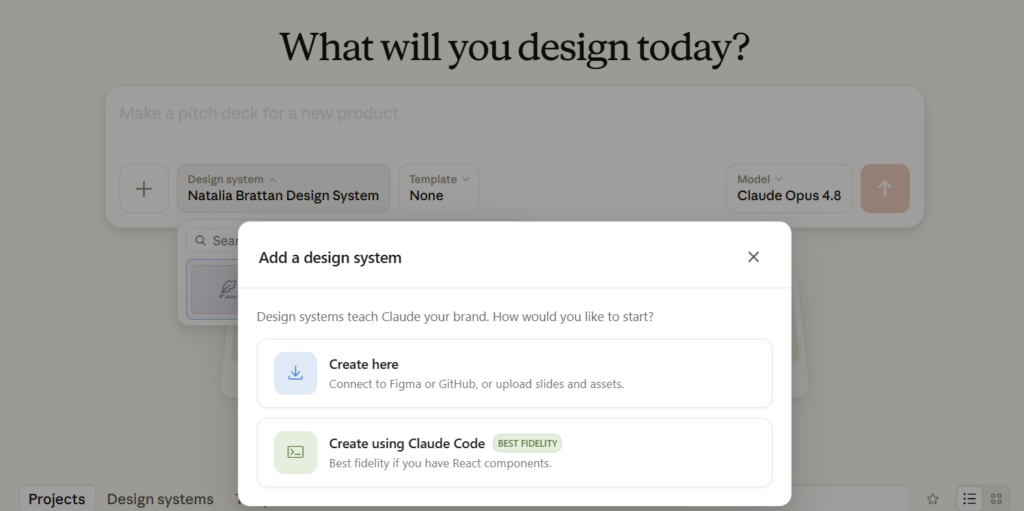
As of June 17, Claude Design can “now sticks to your design system across projects,” per Anthropic. In other words, it follows your brand guidelines.
Action to take:
- Go to claude.ai/design, open design system and click “Create”.
- Create Here lets you build the design system inside Claude Design directly. You connect Figma or GitHub, or upload slides and assets, and Claude extracts your colors, fonts, and components from those. It works for most setups.
- Create using Claude Code. If your website or app is built with React components, your buttons, colors, and fonts already exist as structured code. If that code is available to Claude Code as a local project folder or linked repository, the Claude Code route reads it directly and copies your brand straight from the source.
- Run a test project to confirm output matches before you rely on it.
Note. Claude Design is in beta on Pro, Max, Team, and Enterprise plans. Exports to PowerPoint can lose some fidelity, so the brand holds tightest while you stay on Claude’s canvas.
Thank you for reading today’s edition!
If this issue was valuable, pass it along to a fellow business owner. I’d love to hear your feedback at natalia@nataliabrattan.com.
See you next week,