
👋 Welcome back to AI for SME Success, your weekly dose of practical AI insights that matter to small businesses.
Today we cover:
- What is looping and how to use it
- How to prompt for clarity
- New AI test results from math scientists
- Tool updates: Claude, Gemini, and Copilot
Let’s dive in! 👇
🔁 Looping: The Hot New Way to Work With AI
What is looping?
A viral essay by AI commentator Anatoli Kopadze (9M views) explains it this way: looping is a way of working with AI where you give it a goal, written success criteria, and permission to keep trying a set number of times until it either meets the criteria or hits its iteration cap.
Here is an example:
TASK: Draft an email to a HubSpot lead who downloaded our pricing guide.
SUCCESS CRITERIA:
- References why they downloaded the pricing guide
- Offers one time-bound piece of value aligned with the lead’s needs
LOOP PROTOCOL, every turn:
- PLAN – plan what you will write.
- DO – write or improve the email.
- VERIFY – score your writing against success criterion from 1 to 10.
- DECIDE – if every score is 8+, stop. Otherwise continue iterating.
The new and important elements of looping are: written success criteria, making AI score against the success criteria, iterating up to a certain number of times, and stopping when every score is above the threshold.
While looping can reduce manual effort required to verify AI results, it can be expensive because it requires more compute time and technical knowledge to run at scale.
Looping Is gaining traction inside big companies
The Register reports that Amazon is replacing human approval steps with layered AI guardrails after its security VP argued humans stop paying attention to repetitive checks. Microsoft CEO Satya Nadella has also advocated for AI “loop learning.”
Takeaway: Looping is emerging fast. The two elements every AI user can adopt today are written success criteria and asking AI to score its own results. If you do build loops, cap the number of iterations and set firm thresholds on success scores.
🔧 How to Write Prompts That AI Clearly Understands
Prompt like a pro without learning how to prompt. A very simple 2-step approach.
Did you know that the major AI tools rewrite your prompts into XML form with proper use of delimiters to separate instructions from data and examples? Anthropic’s Console prompt improver, for example, standardizes your prompts, and on Anthropic’s own multilabel classification test, this lifted accuracy by 30%.
You don’t need to learn how to structure prompts with delimiters yourself. In prompt one, ask your AI tool how to apply prompting best practices. In prompt two, apply those best practices to your task description.
Here is an example.
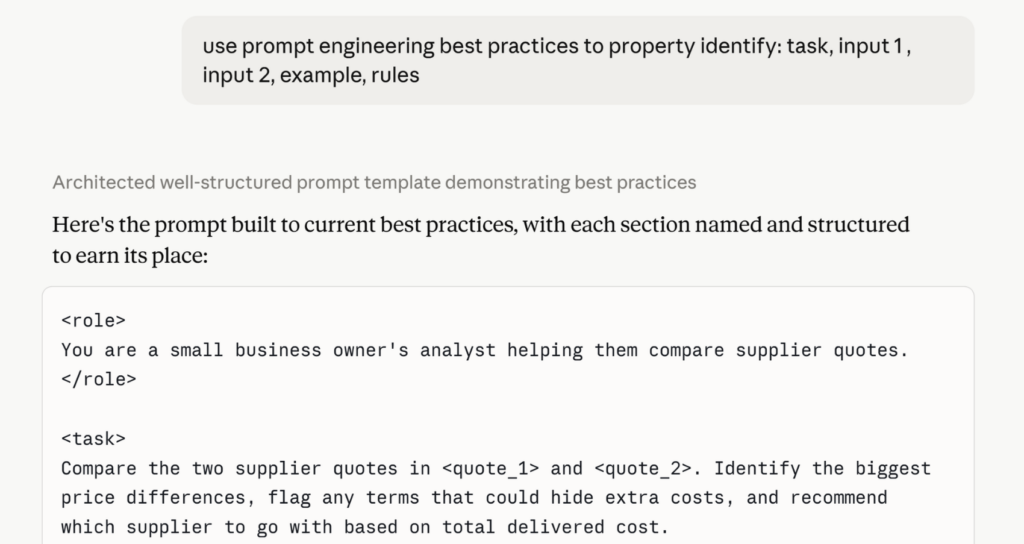
Prompting best practices you can reference:
- Anthropic’s interactive prompt engineering tutorial
- Google’s guide to structuring prompts with delimiters
- Google’s Gemini prompt design strategies
- OpenAI’s prompt engineering best practices
🔍 New Research: AI Wins Routine Tasks, Fails Citations
New AI test results from math scientists that can benefit us all.
First Proof is an organization that tests AI’s capabilities in research math. The June 2026 research results indicate the following strengths and weaknesses of the latest AI models, including ChatGPT 5.5:
- Strong on familiar, weak on novel. AI solved a problem by translating an author’s earlier results into the new setting. AI couldn’t solve a problem with no close precedent.
- Citation failures and plagiarism. AI plagiarised by reusing an author’s terminology and labels line by line with no citation. AI also cited papers that did not contain the cited result.
- Detailed on simple, vague on difficult tasks. AI handled simple parts meticulously while glossing over the most difficult steps.
- Better quality, higher cost. Meaningful improvements to the results come at substantial financial cost.
AI solved 70% of problems with a passing grade. While one solution was novel, AI showed multiple failure patterns.
Takeaway: Use AI for variations of simple, well-documented tasks. Break complex tasks into small verifiable chunks. Run a plagiarism check on anything that goes out under your name.
🤖 Tool Updates: Claude, Gemini, and Copilot
Three major AI tools got more capable.
Anthropic: Claude now works inside Slack
Anthropic launched Claude Tag, which lets your team assign work to Claude by tagging @Claude in any Slack channel instead of opening a separate chatbot. With permission, it can reach approved company tools, documents, and codebases, follow a channel’s ongoing work, then finish the task and report back. For a small team, it means handing off research or drafting without leaving the conversation.
Google: Gemini takes control of the screen
Google rolled out computer use in Gemini 3.5 Flash, letting it click, type, and navigate apps on its own. In Google Sheets, Gemini can now troubleshoot formula errors by reading the rest of your sheet to infer what you were trying to do. Google Finance also added custom desktop controls and AI portfolio tracking. For solo operators, the Sheets fix is the most useful.
Microsoft: Copilot in Excel shows its work
Microsoft updated Copilot in Excel so its formulas now leave a traceable paper trail, letting you see and audit how each result was reached instead of trusting a black box. The change targets finance work where every number has to be defensible. If you keep your books or build forecasts in Excel, this makes AI-assisted formulas safer to rely on.
Thank you for reading today’s edition!
If this issue was valuable, pass it along to a fellow business owner. I’d love to hear your feedback at natalia@nataliabrattan.com.
See you next week,