
👋 Welcome back to AI for SME Success, your weekly dose of practical AI insights for small businesses.
Today we cover:
- 3 easy steps from chatbot to business partner
- Talking with AI: small business use cases
- This week in AI: video review, Google Pics and shopping agents
Let’s dive in! 👇
🪜 3 Easy Steps from Chatbot to Business Partner
A few small changes to your AI setup can bring real business benefits.
Sara Russell, featured in Business Insider, owns Main Land Vintage, a bath-and-body boutique.
Sara started her AI journey the way most beginners do by asking ChatGPT random questions and using it to draft Instagram captions. She rejected 75% of the answers.
Here’s how she’s got real business benefits from AI:
- AI Departments. Sara opened a $20/month Claude account and created a separate Claude Project for each function of her business: marketing, sales, finance, and product development. She also created a project for a Chief of Staff.
- Instructions & Context. She wrote instructions defining each Project’s role and gives each one context on her current situation and goals. Her Marketing Project, for example, has a dedicated Instagram Strategy chat where she shares what she’s currently doing and asks Claude to research ways to convert her audience into customers.
- Cross-Project Collaboration. Sara instructed the Projects to collaborate, but she remains the final decision-maker. Her Chief of Staff Project runs a monthly recap that pulls together the work from every department, covering what she’s delivered on, what she hasn’t, the sales numbers, and what’s coming up.
Sara says 75% of what she does with Claude now, she wouldn’t have been able to do before.
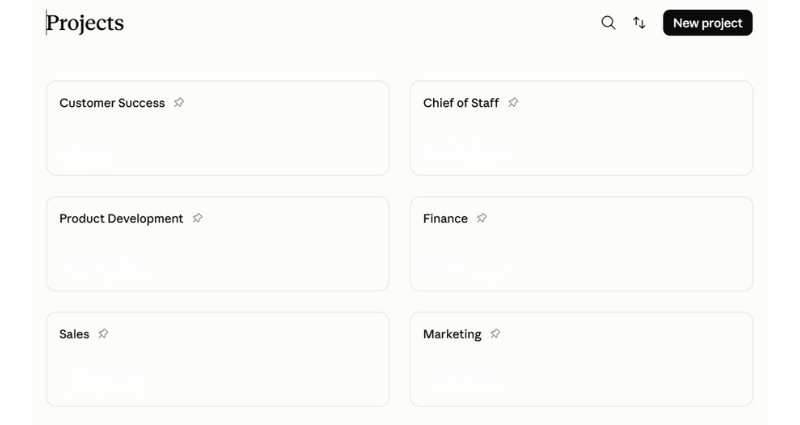
Example of Projects in Claude.
Takeaway: Dedicated projects, clear instructions, and cross-project collaboration work with many AI tool that supports custom instructions and persistent context. They’re easy steps any small business owner or solopreneur can take to see real value from AI.
🎙️Talking with AI: Small Business Use Cases
Talking with AI has gone mainstream. Here are two low-risk use cases that can save you hours.
Use Case #1: Dictate Your Draft, Let AI Finish It
Successful people capture ideas. Sara Blakely, the founder of Spanx carried a notebook everywhere for 20+ years. Richard Branson credits much of his success to note-taking. Bill Gates is known for the same habit.
With AI dictation, you can now narrate not just quick ideas but entire documents including articles, onboarding notes, and podcast scripts.
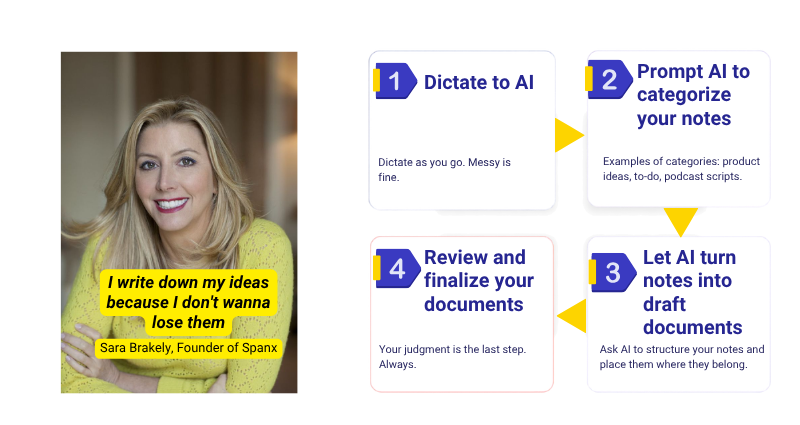
4 steps to turn your AI dictation into documents.
Here is how to do it:
- Put a dictation app like Wispr Flow on your phone. Dictate articles, to-dos and ideas on the go in a completely unstructured way.
- At the end of the day, upload the transcript to a tool like Claude and ask it to sort everything into categories, like to-dos, key ideas and draft documents.
- For each draft document, use this prompt: “Organize the content logically using descriptive headings and sections. Correct language and grammar. Begin with a concise overview of the main takeaways, call attention to significant or recurring themes, and convert relevant information into well-organized tables. Deliver a professional document that is clear, coherent and ready for distribution.”
- Review and finalize your documents.
Use Case #2: Let AI Talk You Through Your Information
Turn reading time into listening time including your inbox, long articles, customer feedback, a client proposal.
For long documents, use a reader like Speechify or ElevenLabs Reader, or Gemini Notebook if you’d rather hear the material discussed than read straight through.
For emails and customer feedback, you’ll need your inbox or CRM connected to your AI tool.
📡 This Week In AI: Anthropic & Google
- Google Pics (Editing AI Images!) AI image creation and editing directly in Docs, Slides, and Drive. Similar to Adobe Firefly, Google Pics lets you edit text and details within images without regenerating the whole picture. Unlike Canva’s Magic Layers, which offers you a manually-editable set of text and visuals, Pics isolates an element you wish to edit and keeps you in conversation with the AI.
- Agentic video review. The Gemini agent can now analyze video recordings, from security feeds to recorded client demos to podcast recordings. What used to require hours of manual watching or expensive software fees can now take minutes. The new agentic video model solves this by letting AI intelligently skim footage and zoom in only on relevant scenes.
Anthropic
- Blueprint for AI shopping agents. In preparation for the holiday season, Anthropic released a free, open blueprint for commerce agents covering retail and marketplace, travel, telecom, and entertainment. You can either run it yourself or have Anthropic run it for you. Doing it yourself costs only standard Claude usage rates, but the setup and ongoing maintenance are on you. Letting Anthropic host it through Claude Managed Agents (beta) adds $0.08 for each hour a session is active, on top of the standard per-token costs. Anthropic reports early adopters seeing cart sizes up to 35% and completion rates up to 60% higher.
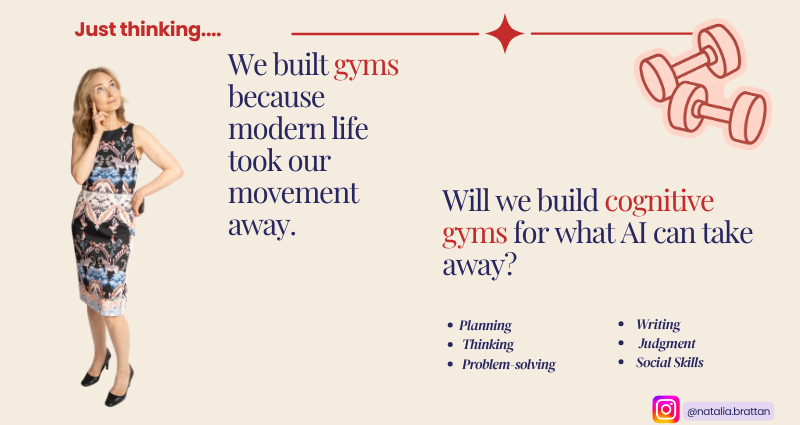
Could “cognitive gyms” become a reality in the future? Let me know what you think!
Thank you for reading today’s edition.
If this issue was valuable, pass it along to a fellow business owner. I’d love to hear your feedback at natalia@nataliabrattan.com.
See you next week!